Most people who'd benefit from a cloud server don't have one. They assume it's expensive. They assume it's complicated. They picture a terminal window full of Linux commands and a monthly bill that climbs every time traffic spikes.
None of that is true any more.
Managed cloud servers at 365i start at £9.99/month. You get the same My365i control panel you'd use on shared hosting. Same one-click installs. Same daily backups. Same support team. The difference is what happens underneath: dedicated CPU, dedicated RAM, and a stack of performance tools (Redis, ElasticSearch, unlimited PHP workers) that shared hosting simply can't offer.
This guide is for anyone running a site on shared hosting who's wondering whether cloud is worth the step up. Sometimes it is. Sometimes it isn't. Here's how to tell.
What Shared Hosting Actually Gives You
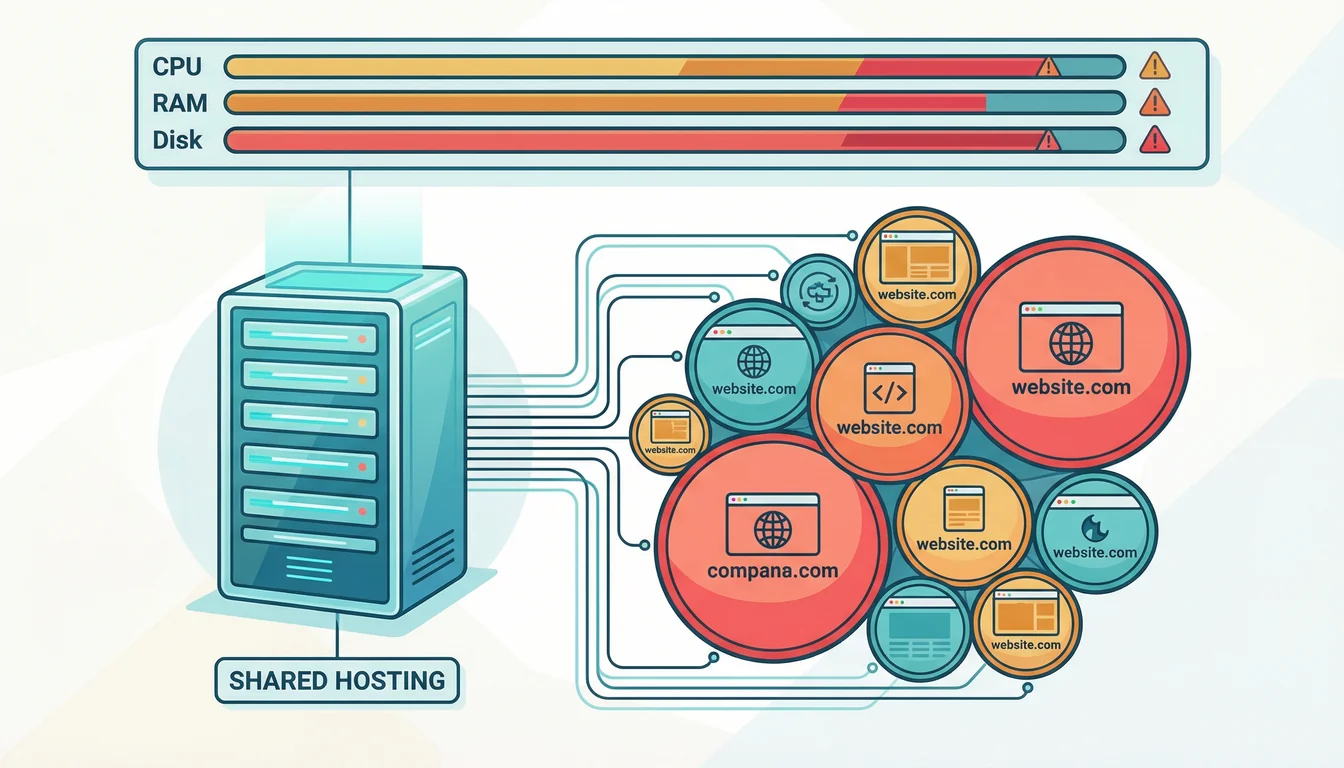
Shared hosting puts your website on a server alongside other customers' sites. Everyone shares the same CPU, RAM, and disk I/O. It's affordable, it's managed, and for a huge number of websites it's the right choice.
365i's WordPress hosting starts at £5.99/month and includes automatic updates, daily backups, staging environments (Premium and above), free SSL, and CDN. Web hosting plans start at the same price with 80+ one-click application installs. Both come fully managed with the My365i control panel.
For brochure websites, personal blogs, portfolios, and small business sites that get a few hundred visitors a day, shared hosting is more than enough. The servers are fast, the platform is stable, and you're not paying for resources you don't need.
But shared hosting has a ceiling.
Where Shared Hosting Hits Its Limits
365i's WordPress and Linux hosting platforms run on an autoscaling cloud infrastructure with unlimited LVE (Lightweight Virtual Environment) resources. That means no CPU throttling, no memory caps, and no limits on PHP processes, even on the cheapest plan. The platform scales resources automatically during traffic spikes.
So if there are no resource limits, why would you ever need a cloud server? Because shared hosting still shares the underlying hardware. Your site runs alongside other accounts on the same physical server. The unlimited LVE resources mean you won't be throttled, but certain workloads benefit from having dedicated CPU cores and RAM that no other account can touch:
Sites with lots of logged-in users. Caching works brilliantly for anonymous visitors because everyone sees the same page. Logged-in users get personalised content: their name in the header, their order history, their dashboard. That means every request hits PHP and the database instead of being served from cache. A membership site, LMS, or client portal with 50 logged-in users at the same time can consume PHP workers quickly on shared hosting.
WooCommerce stores with large catalogues. Every product search, every filtered category page, every cart calculation triggers database queries. A store with 500+ products and steady traffic will run more queries per page than a standard blog post generates in a week. Shared hosting handles small stores well, but the query volume from a busy WooCommerce site is a different class of workload.
Content-heavy sites with complex queries. If your WordPress site has thousands of posts, custom post types, Advanced Custom Fields pulling related content, or a search feature that queries across multiple taxonomies, each page load involves more database work than a simple blog. The more complex your data relationships, the more you benefit from dedicated resources.
Traffic spikes. A blog post goes viral, a product launch drives a surge, or a seasonal event doubles your normal traffic. Shared hosting absorbs moderate spikes well, but your site is competing for resources with everyone else on that server. Cloud servers don't have that contention.
What a Cloud Server Gives You That Shared Can't
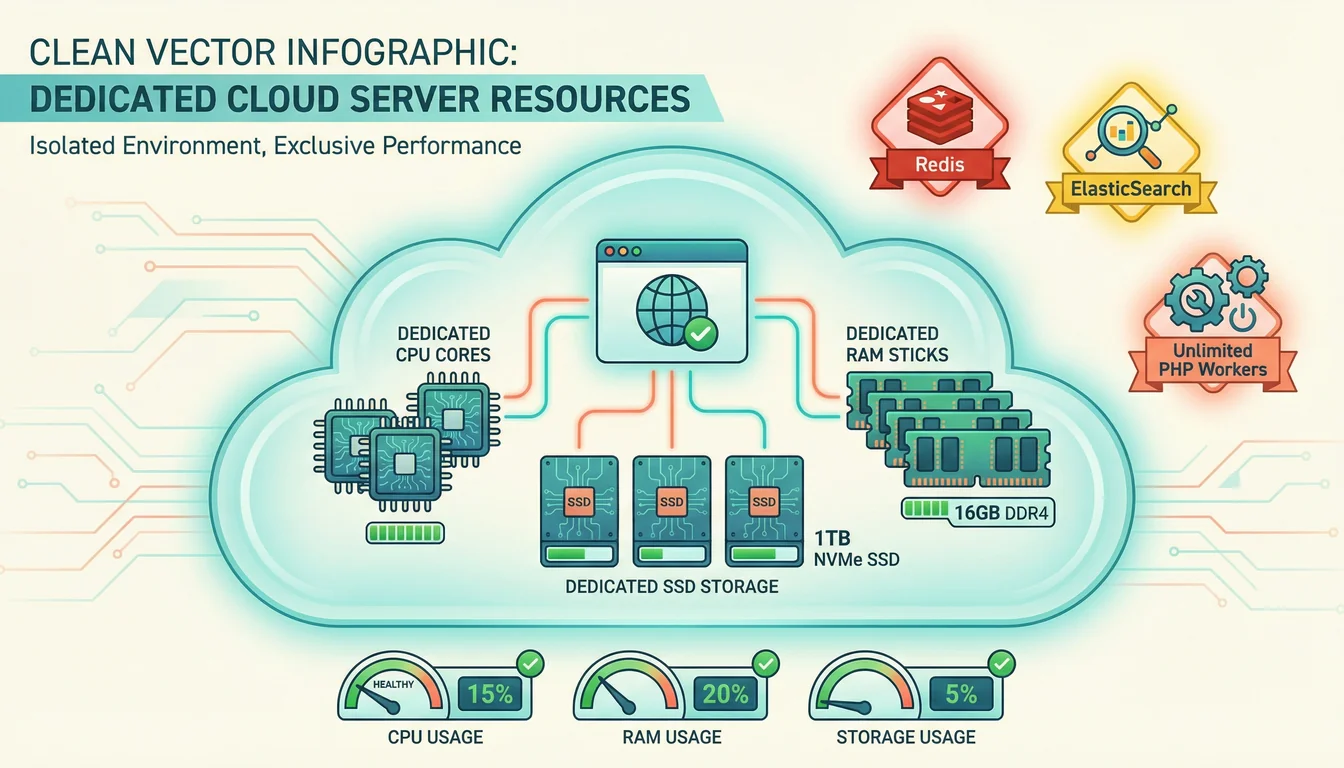
A managed cloud server is your own virtual machine. The CPU cores, the RAM, and the SSD storage are yours alone. Nobody else's traffic spike can slow your site down.
Here's what that means in practice:
Dedicated Resources
The entry-level Micro plan (£9.99/month) gives you 1 CPU core, 1 GB RAM, and 25 GB SSD. That's modest, but it's all yours. The Medium plan (£39.99/month) steps up to 2 cores, 4 GB RAM, and 80 GB SSD. For comparison, a shared hosting account shares these resources across potentially dozens of sites.
Dedicated resources mean predictable performance. Your site loads at the same speed at 9am on a Monday as it does during a Friday traffic spike. There's no "noisy neighbour" problem because there are no neighbours. And as we covered in our piece on why hosting is the real conversion killer, that consistency is what turns visitors into customers.
Redis Object Caching
Redis is an in-memory data store included free on every cloud server. It sits between your application and the database, keeping frequently requested data in RAM instead of querying MySQL every time.
For WordPress, this means admin dashboard pages that load in under a second instead of 3-4 seconds. For WooCommerce, it means cart pages, account pages, and category listings that respond instantly even under heavy traffic. Redis is one of those things you don't know you're missing until you've used it. Going back to shared hosting without it feels slow.
ElasticSearch
ElasticSearch is a search engine that runs alongside your database. It's included on all cloud servers and it transforms product search for WooCommerce stores.
Standard WordPress search queries the database directly, which gets slower as your content grows. ElasticSearch indexes your content separately and returns results almost instantly, regardless of how many products or posts you have. A WooCommerce cloud server with ElasticSearch handles product filtering, search suggestions, and faceted navigation at a speed that MySQL alone can't match.
Unlimited PHP Workers
PHP workers are the processes that execute your site's code. On shared hosting, you get a set number. On cloud, there's no artificial limit. Your server uses as many workers as its CPU and RAM can support.
This matters most for logged-in user experiences. A membership site with 100 concurrent logged-in users needs 100 concurrent PHP processes to serve those personalised pages without queuing. On shared hosting, requests queue behind each other. On cloud, they execute in parallel.
99.99% Uptime Target
Shared hosting has a 99.9%+ historical uptime record. Managed Cloud Servers are designed for 99.99% uptime, supported by redundant power, cooling, and connectivity, with automatic failover at the platform layer. That's the difference between roughly 8.7 hours of potential downtime per year and 52 minutes. For an ecommerce store doing steady sales, those extra 8 hours of uptime pay for the server many times over. (If you specifically need a contractual SLA with service credits, that lives on our VPS products rather than Managed Cloud Servers — see the Terms and Conditions.)
"Systems that Last Align Cost to Business. Make sure the dimensions on which you make revenue are always aligned with your costs."
Werner Vogels, VP and CTO of Amazon, The Frugal Architect (2023)
Vogels wasn't talking about web hosting specifically, but the principle applies perfectly here. Running a hosting company since 2002 has taught us the same lesson from the other side: when a business's website is the thing that generates its revenue, the hosting infrastructure needs to match the stakes. A £40/month cloud server protecting £100k of annual revenue isn't a cost. It's the cheapest insurance policy you'll ever buy.
Same Control Panel, Same Simplicity
Here's the bit most people don't expect: managing a cloud server at 365i feels exactly like managing shared hosting.
You log into the same My365i control panel. You install WordPress with one click. You manage domains, email, SSL certificates, and backups through the same interface. The 80+ one-click app installer works the same way. Staging environments, WordPress management tools, file manager, DNS controls: all identical.
There's no SSH required (though it's available if you want it). No server configuration files to edit. No package managers to wrangle. 365i handles the server-level optimisation, security patches, and monitoring. You handle your website.
This is what "fully managed" actually means. You get the performance of dedicated infrastructure without the operational overhead. The control panel is powerful enough for developers who want granular control and simple enough for business owners who just want their site to work.
When Cloud Makes a Real Difference
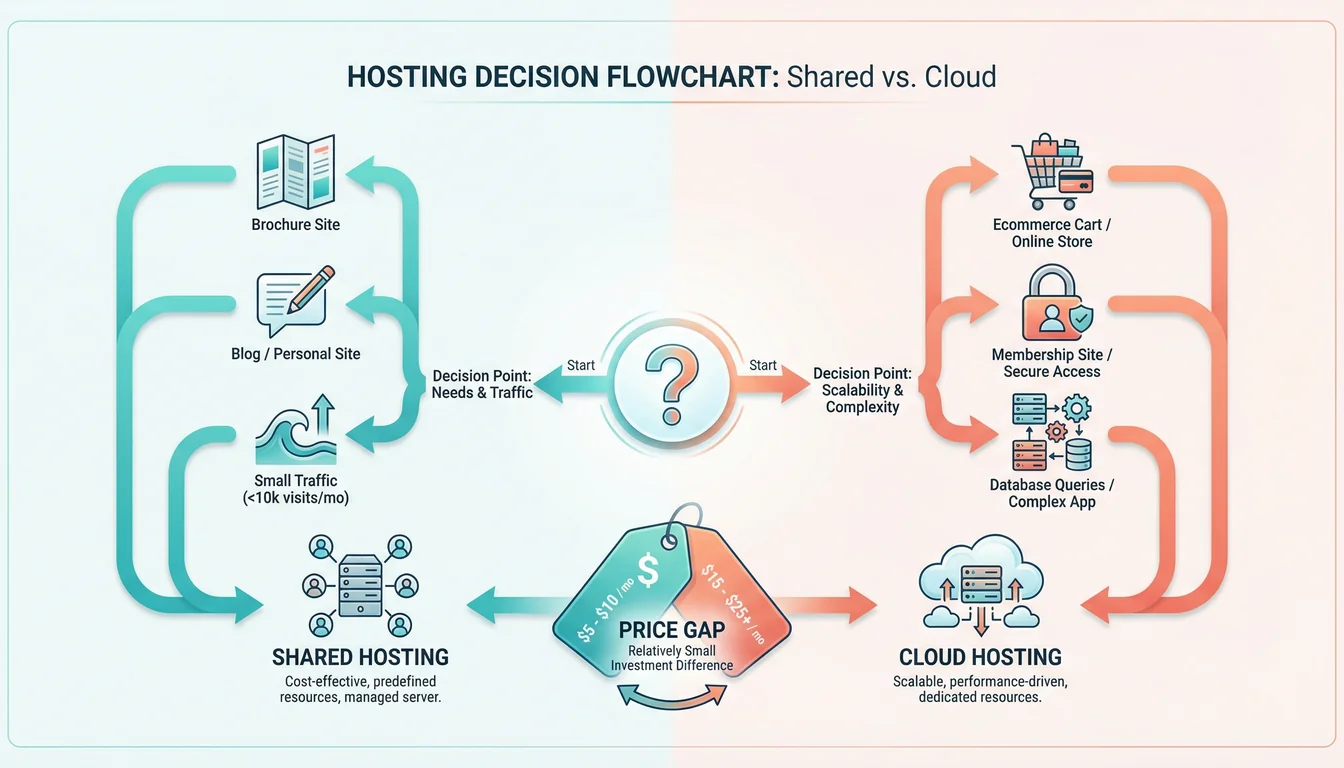
Not every site needs a cloud server. Here's a practical guide to when it makes sense:
| Scenario | Shared Hosting | Cloud Server |
|---|---|---|
| Brochure site, under 1,000 visits/day | Perfect fit | Overkill |
| Blog with 50-100 posts | Handles it well | Not needed yet |
| WooCommerce store, 50-200 products | Works fine with caching | Worth considering |
| WooCommerce store, 500+ products | Starting to struggle | Strong recommendation |
| Membership/LMS with 50+ concurrent users | PHP workers will queue | The right choice |
| Multi-site with 10+ WordPress installs | Possible but constrained | Much better performance |
| Site with regular traffic spikes | Spikes cause slowdowns | Handles spikes cleanly |
| Custom app with heavy database queries | Limited by shared resources | Redis + dedicated DB = fast |
The pattern is clear: if your site's workload is mostly cached HTML served to anonymous visitors, shared hosting is great value. The moment your site depends heavily on database queries, logged-in sessions, or search performance, cloud servers pull ahead.
The Price Is Closer Than You Think
Here's a comparison that surprises most people:
| Plan | Price | Key Specs |
|---|---|---|
| WordPress Premium (shared) | £8.99/mo | 5 sites, unlimited SSD, CDN, staging |
| WordPress Business (shared) | £14.99/mo | 10 sites, unlimited SSD, CDN, 30-day backups |
| Cloud Micro (dedicated) | £9.99/mo | 1 core, 1 GB RAM, 25 GB SSD, Redis, ElasticSearch |
| Cloud Small (dedicated) | £19.99/mo | 1 core, 2 GB RAM, 50 GB SSD, Redis, ElasticSearch |
| Cloud Medium (dedicated) | £39.99/mo | 2 cores, 4 GB RAM, 80 GB SSD, Redis, ElasticSearch |
The Cloud Micro at £9.99/month costs just £1 more than WordPress Premium shared hosting. You lose the multi-site convenience (shared plans allow 3+ sites on one account) but you gain dedicated resources, Redis, ElasticSearch, and unlimited PHP workers. For a single site that needs performance, the cloud Micro is better value.
The Cloud Medium at £39.99/month is where most growing businesses land. Two dedicated CPU cores and 4 GB of RAM is enough for a busy WooCommerce store, a membership site with hundreds of users, or a content-heavy WordPress build with complex queries. All prices exclude VAT.
Gartner forecasts that worldwide public cloud spending will hit $723 billion in 2025, up 21.5% year on year. That growth isn't being driven by enterprise alone. Small businesses are a growing share of it, because the economics have shifted. Cloud used to cost 5-10x more than shared hosting. Now it starts at roughly the same price, with measurably better performance. Those prices may not last, though: AI-driven DRAM shortages are pushing cloud hosting prices up 25-50% at the hyperscaler level, which makes locking in a flat-rate managed plan now look increasingly prudent. If you're deciding between 365i's managed cloud and the big hyperscalers, our comparison of AWS, Google Cloud, and 365i managed cloud breaks down the real differences.
When Shared Hosting Is Still the Right Choice
Cloud isn't always better. Shared hosting wins when:
- You're starting out. A new site with low traffic doesn't need dedicated resources. Start on shared, grow, and upgrade when the numbers justify it.
- Your site is mostly static content. A well-cached blog or portfolio serves thousands of visitors a day from shared hosting without breaking a sweat.
- You want multiple sites on one plan. WordPress Business (£14.99/mo) hosts up to 10 sites. Doing that on cloud would mean either one cloud server running all 10 (which needs a larger spec) or separate servers per site.
- Budget is the priority. If you need hosting at the lowest possible cost and performance is "good enough", shared hosting delivers tremendous value from £5.99/month. Be careful going below that price point, though. Our look at the hidden costs of cheap WordPress hosting shows where bargain-bin providers start costing more than they save.
There's no shame in shared hosting. It powers millions of successful websites. The question is whether your specific site has outgrown what shared resources can deliver. If you're not sure whether hosting is actually your bottleneck, our WordPress speed guide walks through how to tell.
"Having lots of traffic to your site shouldn't be an issue in 2018. Any halfway decent host and any halfway decent caching plugin should be fine."
Matt Mullenweg, Co-founder of WordPress, Marketing Speak Podcast
Mullenweg said this back in 2018, and for basic sites it's still true. Good hosting and decent caching handle normal traffic just fine. Where his point breaks down is with dynamic, personalised content: WooCommerce carts, membership dashboards, complex search. Those workloads don't benefit much from page caching because every user sees something different. That's precisely where cloud servers earn their keep.
WooCommerce and Cloud: The Most Obvious Upgrade
WooCommerce deserves its own mention because it's the use case where the cloud advantage is most clear-cut.
An online store generates more database queries per page than almost any other type of WordPress site. Product pages pull pricing, stock levels, variations, reviews, and related products. Category pages filter and sort across the entire catalogue. Cart and checkout pages write to the database with every interaction. And none of this can be cached because every customer's cart is different.
365i's WooCommerce Cloud Hosting starts at £39.99/month (Medium tier: 2 cores, 4 GB RAM, 80 GB SSD). Redis handles object caching so repeated queries come from memory instead of disk. ElasticSearch powers product search and filtering at speeds that make the default WooCommerce search feel broken by comparison.
If you're running a WooCommerce store with more than a few hundred products or processing orders daily, cloud hosting isn't a luxury. It's the infrastructure your store was designed to run on. The recent WooCommerce 10.4.2 update made the platform more stable, but stability without performance is only half the picture.
Moving from Shared to Cloud
Switching from shared hosting to a cloud server at 365i is simple. The migration tools are built into the My365i panel: select your shared site, choose a cloud server, and the platform handles the transfer. DNS, SSL, email, databases, files: everything moves across.
If you're migrating from another provider entirely, the same tools work via cPanel/WHM, Plesk, or SFTP credentials. Our migration guide covers the full process step by step if you want to know exactly what happens before you commit.
Because both shared and cloud hosting run on the same 365i platform, everything you're already familiar with carries over. Same control panel. Same WordPress tools. Same support. The only difference is the performance underneath. We covered PHP 8.5's speed improvements recently, and those gains stack on top of the dedicated resources a cloud server provides.
For agencies managing client sites, this is worth noting. Agency hosting on shared plans works brilliantly for smaller clients. We wrote about why freelancers and small agencies are switching to fixed-cost plans recently, and the appeal goes beyond price. But when a client's site grows to the point where it needs dedicated resources, the upgrade path to cloud is seamless. Same panel, same workflow, better performance.
If your business also invests in how customers find you through AI, our sister site ai-visibility.org.uk covers how AI discovery files help businesses get recommended in ChatGPT, Claude, and other AI tools. Fast hosting and AI visibility work together: the faster your site, the better AI crawlers can index it.
Frequently Asked Questions
Is a cloud server harder to manage than shared hosting?
No. At 365i, both shared and cloud hosting use the same My365i control panel. You manage websites, domains, email, SSL, and backups through the same interface. There's no command line required. One-click WordPress installs, staging environments, and all the same management tools are available on cloud servers just as they are on shared hosting.
How much does a managed cloud server cost?
365i managed cloud servers start at £9.99/month (ex. VAT) for the Micro plan with 1 CPU core, 1 GB RAM, and 25 GB SSD. The most popular Medium plan is £39.99/month with 2 cores, 4 GB RAM, and 80 GB SSD. All plans include Redis, ElasticSearch, free CDN, daily backups, and unlimited SSL certificates. There are 10 tiers available up to 48 cores and 128 GB RAM.
What does Redis caching actually do for my site?
Redis stores frequently accessed database results in server RAM. Instead of querying MySQL every time a page loads, your site reads the data from memory, which is orders of magnitude faster. For WordPress, this means faster admin pages, faster WooCommerce cart operations, and faster dynamic content delivery for logged-in users. Redis is included free on all 365i cloud servers.
Why does WooCommerce benefit from ElasticSearch?
WooCommerce's default search queries the MySQL database directly, which slows down as your product catalogue grows. ElasticSearch creates a separate search index optimised for fast retrieval, filtering, and sorting. Product searches, category filtering, and faceted navigation become almost instant regardless of catalogue size. ElasticSearch is included on all 365i cloud servers and WooCommerce Cloud plans.
How do I know when my site has outgrown shared hosting?
Common signs include slow admin dashboard performance, page load times over 3 seconds under normal traffic, WooCommerce search and filtering feeling sluggish, resource limit warnings in your hosting dashboard, and slow performance during traffic spikes. If your site has many logged-in users, runs a large WooCommerce store, or handles complex database queries, cloud hosting will deliver a noticeable improvement.
Can I migrate from shared hosting to cloud without downtime?
Yes. The My365i control panel includes built-in migration tools that transfer your site from shared to cloud hosting seamlessly. DNS, SSL certificates, email, databases, and files all move across. If you're migrating from another provider, you enter cPanel/WHM, Plesk, or SFTP credentials and the Migration Centre does the rest. It costs nothing, there's no cap on how many times you run it, and support is on hand if you get stuck.
Do cloud servers include WordPress management tools?
Yes. Cloud servers include the full WordPress management suite: one-click installs, staging environments, automatic core updates, plugin and theme management, user management, checksum reports, and WP-CLI access. The WordPress tools are identical to those on shared WordPress hosting because both run on the same 365i platform.
Can I host multiple websites on one cloud server?
Yes. Cloud servers support unlimited websites. You can host as many sites as your server's CPU and RAM can handle. There's no per-site fee. This makes cloud servers cost-effective for agencies or businesses running several sites, as long as you choose a tier with enough resources for the combined workload.
Ready to try a cloud server?
Managed cloud servers from £9.99/month. Same My365i control panel, same support, dedicated resources. Free migration included.
View Cloud Server PlansSources
Published: · Last reviewed: · Written by: Mark McNeece, Founder & Managing Director, 365i
Editorially reviewed by: Mark McNeece on · Our editorial standards