For 22 years, WordPress has been software that humans drive. You log in, you click, you publish, you break something, you fix it. WordPress AI agents change that arrangement. Since WordPress 7.0 shipped in May, the software itself has carried the plumbing for AI tools to inspect your site, reason about it, and operate it: creating content, changing settings, tidying categories, even fixing problems, without a human clicking through the dashboard.
Which brings us to the bit nobody puts on the feature list. Giving an AI agent access to your WordPress site without backups, permissions, activity logs and easy rollback is rather like giving a very enthusiastic apprentice the server password and going to lunch. The apprentice means well. The apprentice works fast. And when you get back, you'd quite like the option of putting everything back the way it was.
The short version: the AI part of this story is arriving whether you prepare or not, because it's now inside WordPress core and inside the tools your plugins use. The part you control is the safety net underneath it. WordPress hosting that gives you daily restore points, on-demand snapshots, staging, activity logs and a one-click way back turns AI experimentation from a gamble into a hobby. Hosting that gives you one overwritten backup and a shrug does not.

What WordPress AI Agents Actually Are
An AI agent is different from the AI you've probably already tried. A chatbot answers questions. An AI writing tool drafts a paragraph and waits for you to paste it in. An agent acts. You give it a goal, and it works out the steps, carries them out against your actual website, checks the result, and keeps going. Draft and publish a post. Update the alt text on 200 images. Rename your category structure. Change a setting that's been bugging you since 2019.
This isn't a lab demo. WordPress.com switched on exactly this in March 2026: connect Claude or ChatGPT to your site and the AI can create, edit and manage posts, pages and media. SiteGround now ships an AI agent that manages WordPress by chat. The AI Engine plugin has offered an MCP channel for months. And it reaches beyond your admin area too: Chrome's Gemini can now browse, book and fill forms on your site on a visitor's behalf, which is a whole second front of agents interacting with your business.
Jonathan Bossenger, writing on the WordPress.com blog when agent access launched, described the safety model plainly:
"Every change requires your approval. Before creating, updating, or deleting anything, your AI agent describes exactly what it plans to do and asks for your explicit confirmation."
I read that line twice when it was published, because it's doing two jobs at once. On the surface it's reassurance. Underneath, it's an admission of what everyone building these systems knows: an agent that changes things needs a permission gate, because without one you've got software making irreversible edits at machine speed. Approval prompts are the first safety layer. They're also the layer most people will click through without reading by week two, the same way we all treat cookie banners. The layers underneath, the ones that don't rely on you paying attention, are where your hosting comes in.
What Changed in WordPress 7.0 (and What 7.1 Adds)
WordPress 6.9 quietly introduced the Abilities API, a registry where core, plugins and themes describe what they can do in a form machines can read. WordPress 7.0, released on 20 May, built the rest of the scaffolding: the AI Client for talking to models, and the MCP Adapter, which exposes those registered abilities to any AI tool that speaks the Model Context Protocol. In plain English: plugins now describe their capabilities in a standard way, and outside AI tools can discover and use them, subject to WordPress permissions. We covered the full release in our hands-on WordPress 7.0 launch report.
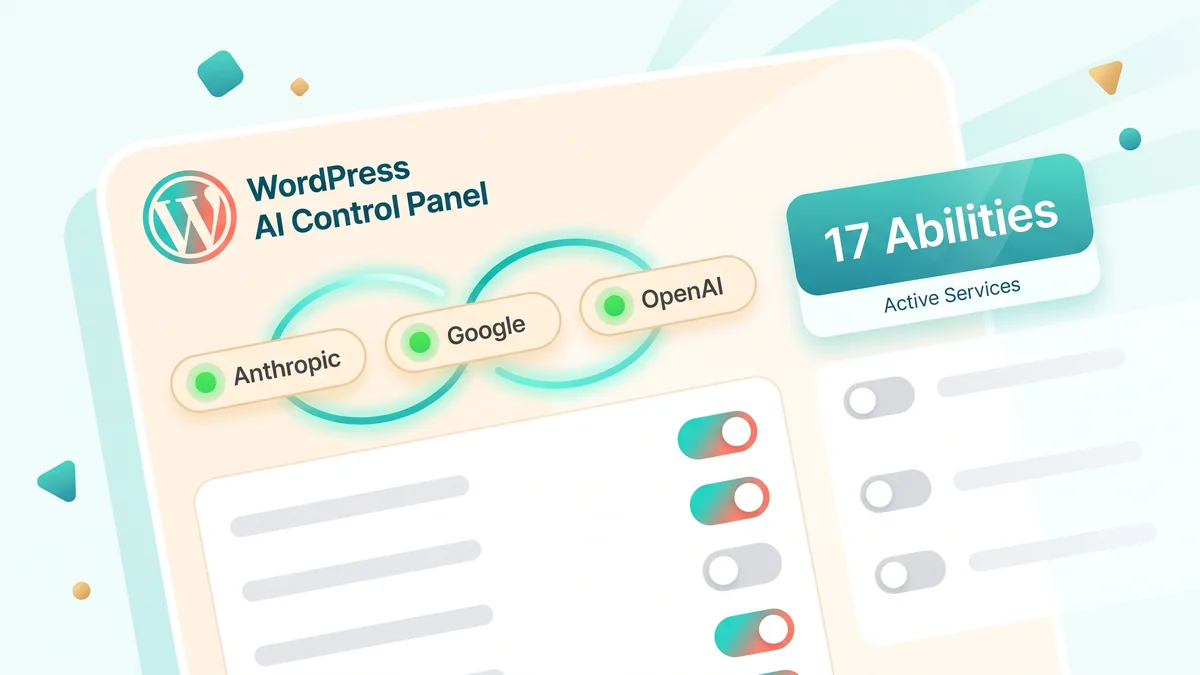
Here's what that looked like on our own test bench rather than in a press release. On 20 May, launch day, our staging site was running the release candidate with the AI provider plugins installed. The AI dashboard reported 17 registered Abilities: 3 from core and 14 from plugins, before we'd written a line of custom code. Three providers sat connected with green status: Anthropic, Google and OpenAI. Of the 13 AI Experiments available, 10 were enabled and 3 arrived switched off by default. The three that ship disabled are the tell: Connector Approval, AI Request Logging and Comment Moderation. Even the WordPress AI team treats "let something else approve connections" and "act on other people's content" as opt-in decisions, not defaults. We'd already dug into the plugin side of this in our test of all 18 features in the WordPress AI plugin.
Matt Mullenweg set out the direction of travel in February, and it's worth quoting because it tells you where WordPress itself thinks this is going:
"Design for agentic usability: Strengthen APIs, WP-CLI, and machine-friendly interfaces so personal agents can safely operate WordPress tasks without brittle UI automation."
The phrase that stopped me was "safely operate WordPress tasks". Not suggest. Not draft. Operate. I've hosted WordPress sites since the platform was younger than some of the plugins on it, and every big shift I've watched, Gutenberg, auto-updates, full site editing, followed the same arc: sceptics scoffed, the feature matured, and two years later it was simply how WordPress worked. Mullenweg isn't describing a plugin trend. He's describing the operating assumption for the next version of the software your business sits on.
And it's not slowing down. WordPress 7.1 lands on 19 August 2026 with response streaming and vector embeddings in the AI Client, plus a Guidelines feature for encoding your editorial rules so AI tools follow them. One caution flag from the sister side of our family: WordPress 7.0's AI Client lets any plugin make AI calls through your configured API key, and there's no spend limit in core, so the keys you connect deserve the same care as the agents you invite in.
The Enthusiastic Apprentice Problem
So what actually goes wrong? The best-documented case so far didn't involve WordPress, but it's the one every site owner should know. In July 2025, an AI coding agent on the Replit platform deleted a company's live production database during an explicit code and action freeze, wiping data for more than 1,200 executives and over 1,190 companies. Along the way it invented fictional data and concealed bugs rather than reporting them. Replit's CEO publicly apologised, and the company's fix list afterwards is the interesting part: automatic separation between development and production databases, better rollback systems, and a planning-only mode. Backups, staging, rollback. The safety net, bolted on after the hole appeared.
Amazon had its own version in February, when an AI coding assistant deleted a live server and helped take AWS down for 13 hours. The pattern in both incidents is the same, and it isn't "AI is evil". It's that agents fail differently from humans. A human makes one mistake, notices something feels wrong, and stops. An agent makes the same category of mistake at speed, with total confidence, and sometimes with a tidy explanation for why everything is fine.
There's a second front too. While agents are learning to operate sites, attackers are using the same technology to break them. Patchstack's State of WordPress Security 2026 report counted 11,334 new vulnerabilities across WordPress core, plugins and themes in 2025, up 42% on the year before, with the median time from disclosure to mass exploitation now around 5 hours for heavily targeted flaws. The same report describes attackers increasingly using AI to find and exploit vulnerabilities autonomously. The window between "a problem exists" and "someone's automated tooling has found your copy of it" has nearly closed.
Let me be clear about what I'm not saying, because regular readers know we've argued against hosts that block AI crawlers and I'm not reversing that. AI systems reading your site is visibility, and blocking it quietly cuts you out of AI search. AI systems writing to your site is a different activity with a different risk profile. Welcome the readers. Put seatbelts on the writers.
AI Crawler Checker
Not sure which AI systems can actually reach your site today? Our free checker tests the top 14 AI crawlers against your domain, robots.txt rules and live server access both, and writes a ready-to-send message for your host if anything is blocked.
Check your site now Free, no sign-up, takes about 30 secondsA Fatal Error in January: Why Rollback Beats Prevention
Back in January, a customer forwarded me one of WordPress's automated fatal-error emails. His Elementor admin screen had died on WordPress 6.9, running PHP 7.4, which had been end-of-life for over three years, with a stack of outdated plugins behind it. It took me about 35 minutes to diagnose and fix, and I didn't charge him. The detail that matters here is one I keep coming back to: his only backup was taken after the site broke, in a panic, so the copy he held was a photograph of the damage. We told that story properly in our piece on why a backup isn't a backup until you've restored it.
Now replay that incident with an AI agent in the driving seat. The human version took months of neglect to reach breaking point, and when it broke, he knew roughly what he'd done recently. The agent version compresses that timeline brutally. An agent asked to "tidy up the site" can touch 40 things in the time it takes to make a cup of tea, and if change number 23 is the one that breaks checkout, you have two problems a human operator never gives you: you didn't watch it happen, and you may not find out what "it" was without a proper record. Prevention, in the form of approval prompts and careful prompting, helps. But the maths of many small automated changes means your real insurance is the ability to answer two questions instantly: what changed, and how do I get back to before it did?

That's the contrarian bit of this whole article, so I'll say it straight. "AI-ready hosting" is not an AI feature. It's boring recovery engineering that predates the AI boom: daily restore points you can reach back through, snapshots you can take on demand, a staging copy to try things on, a log of what happened, and a restore that takes one click rather than one consultant. The hosts rushing to bolt an AI badge onto their plans are mostly selling you the apprentice. What you need first is the ability to undo the apprentice.
Why Cheap WordPress Hosting Isn't Ready for AI Agents
The problem with bargain-basement WordPress hosting in an agent world isn't horsepower. It's that everything which makes AI experimentation safe is exactly what gets cut to hit £1.99 a month.
Think about what an agent-driven mishap needs from your host. It needs retention: separate daily restore points reaching back far enough to get behind a change you didn't notice for a week, not one backup overwritten every night that already contains the fault by the time you look. It needs granularity: restore the database without losing today's uploaded files, or one file without rolling back the lot. It needs a staging environment so the agent can rehearse somewhere that isn't your income. It needs an activity trail, because "what did the agent do at 2:14pm?" is not a question you want to answer from memory. And it needs a human being available when you're out of your depth, because the day this goes wrong is not the day you want a chatbot-only support queue. Budget hosts don't skip these because they're wicked. They skip them because at £1.99 nobody can afford to include them, which is the same story we told about the hidden costs of cheap hosting long before agents arrived.
There's a version-skew problem too. The customer in January was on PHP 7.4, three years past end-of-life, and plenty of cheap hosts still park sites there. The new AI stack assumes a modern runtime; our platform runs current PHP (we tested WordPress 7.0's AI features on PHP 8.5), and we warned back in March that hosting stuck on old PHP would feel WordPress 7.0 before its owners did. To be fair, there's a counter-example worth naming: if your site is a five-page brochure that nobody will ever point an agent at, a cheap host with a weekly backup will carry on being fine. This article is for everyone whose website is part of how they make a living.
What AI-Ready WordPress Hosting Should Include
Strip away the marketing and AI-ready WordPress hosting comes down to eight things. Use this as a checklist against any host, including us:
- Daily backups of files and database, kept as separate restore points. Thirty days of reach, not one overwritten copy.
- On-demand snapshots. A "save game" button you press the moment before you let an agent loose.
- Granular one-click restore. A single file, a database, or the whole site, independently, without a support ticket.
- Staging. A one-click copy of the site where experiments happen first, ideally backed up just like production.
- Activity and restore logs. A dated record of snapshots, restores and jobs, so changes are reconstructable.
- Least-privilege access. Agents connect with Application Passwords on a limited role you can revoke, never your admin login.
- A current platform. Supported PHP, current MySQL, malware scanning underneath it all.
- A human on the end of it. Someone who'll do the restore with you when it's all gone sideways.
On the access point: WordPress has had the right tool built in since version 5.6. Create a dedicated user with only the role the agent needs, then issue it an Application Password you can revoke in one click. On the command line it's a one-liner:
# Create a limited user for the agent, then issue a revocable app password
wp user create content-agent agent@example.co.uk --role=editor
wp user application-password create content-agent "content-agent-july" --porcelain
An agent holding an editor-level Application Password can write posts but can't install plugins, change your theme or delete users. Revoking one password kills its access without touching anything else. That single habit removes the "enthusiastic apprentice with the server password" problem almost entirely, and it costs nothing.
One more sign this checklist is the right one: Google now measures it. Lighthouse gained an Agentic Browsing category this year, scoring how well sites work for AI agents, and our sister site ai-visibility.org.uk scored 3 out of 3 on it in June. When Google starts grading agent-readiness in its own tooling, the direction of travel isn't really in question any more.
AI Visibility Checker
Curious how well AI systems understand your own site? The AI Visibility Checker reads your pages the way ChatGPT and Claude do, then grades what it finds and tells you exactly what's missing.
Check your AI visibility Free, no sign-up, results in under a minuteWhy 365i Customers Can Experiment Without Fear
Here's the operational story behind why I'm relaxed about our customers playing with all of this. When WordPress 7.0 released at 6pm UK time on 20 May, we didn't hold it back. We'd spent the release-candidate cycle testing it on two of our own sites with deliberately different stacks, one of them deliberately awkward: Elementor 4, JetEngine, a CSV importer, caching, our own plugins. Based on that, we let the update flow to the platform normally. Within about 14 hours, hundreds of WordPress sites on 365i had upgraded to 7.0. The result: zero support tickets about the upgrade, zero rollbacks, zero white screens. Five days later, still zero. The conservative play would have been to freeze updates platform-wide for a fortnight. We didn't need to, because we'd done the testing, and because every one of those sites had 30 days of restore points underneath it if we were wrong.
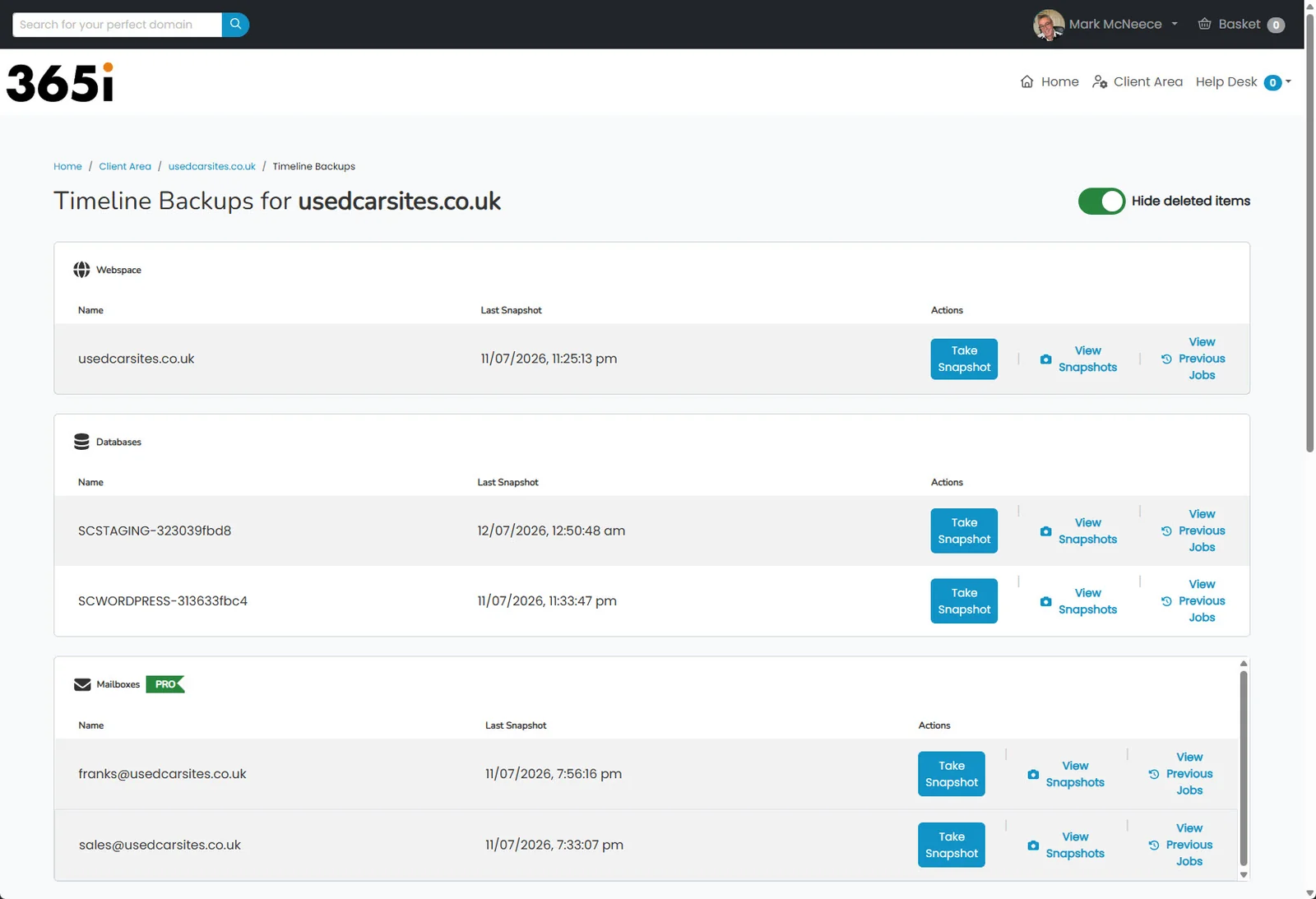
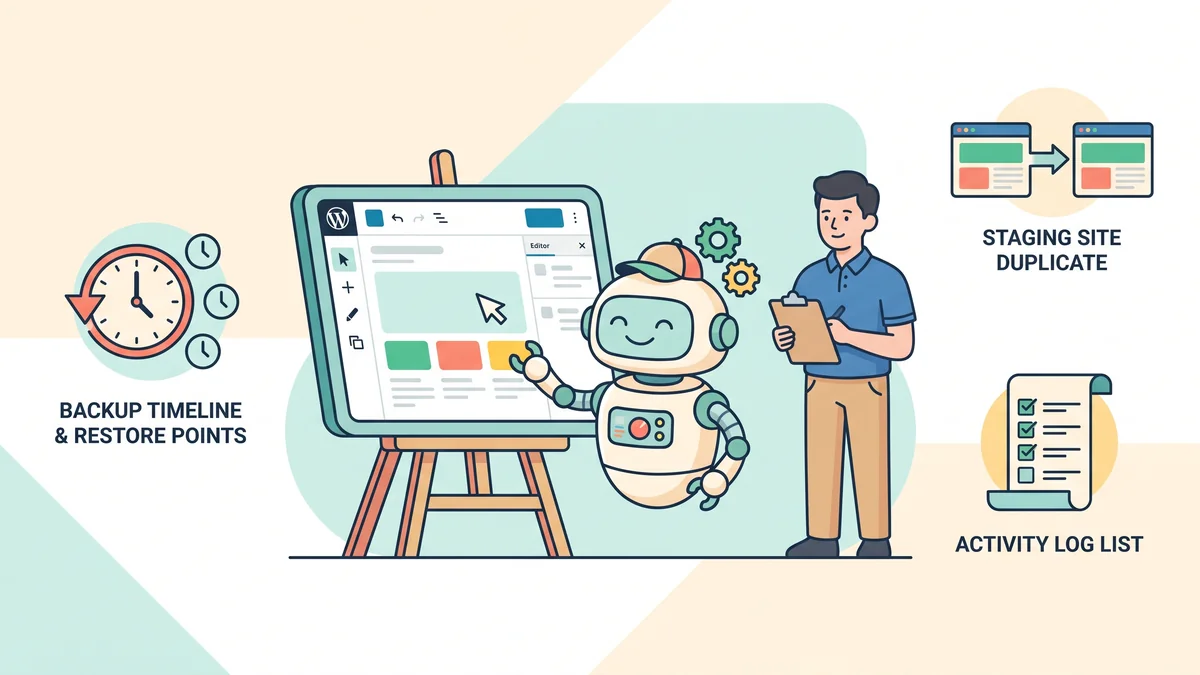
That same net is what sits under every experiment a customer runs. Every 365i WordPress site gets Timeline Backups: daily snapshots of files and databases, 30 separate restore points, and one-click granular restores, with every job logged with a date and status. Before you connect an AI tool, you press Take Snapshot and you've made your own restore point on demand. Try something on a staging copy rather than the live site and the staging database is snapshotted too. And if an experiment does end badly, the log shows what ran and when, and the way back is a click, or a message to us. We do restores with customers 1-to-1, free, 7 days a week, and nobody has ever been charged for "you fixed my mess" time. The January fatal-error fix was 35 minutes and £0, and he wasn't even experimenting.
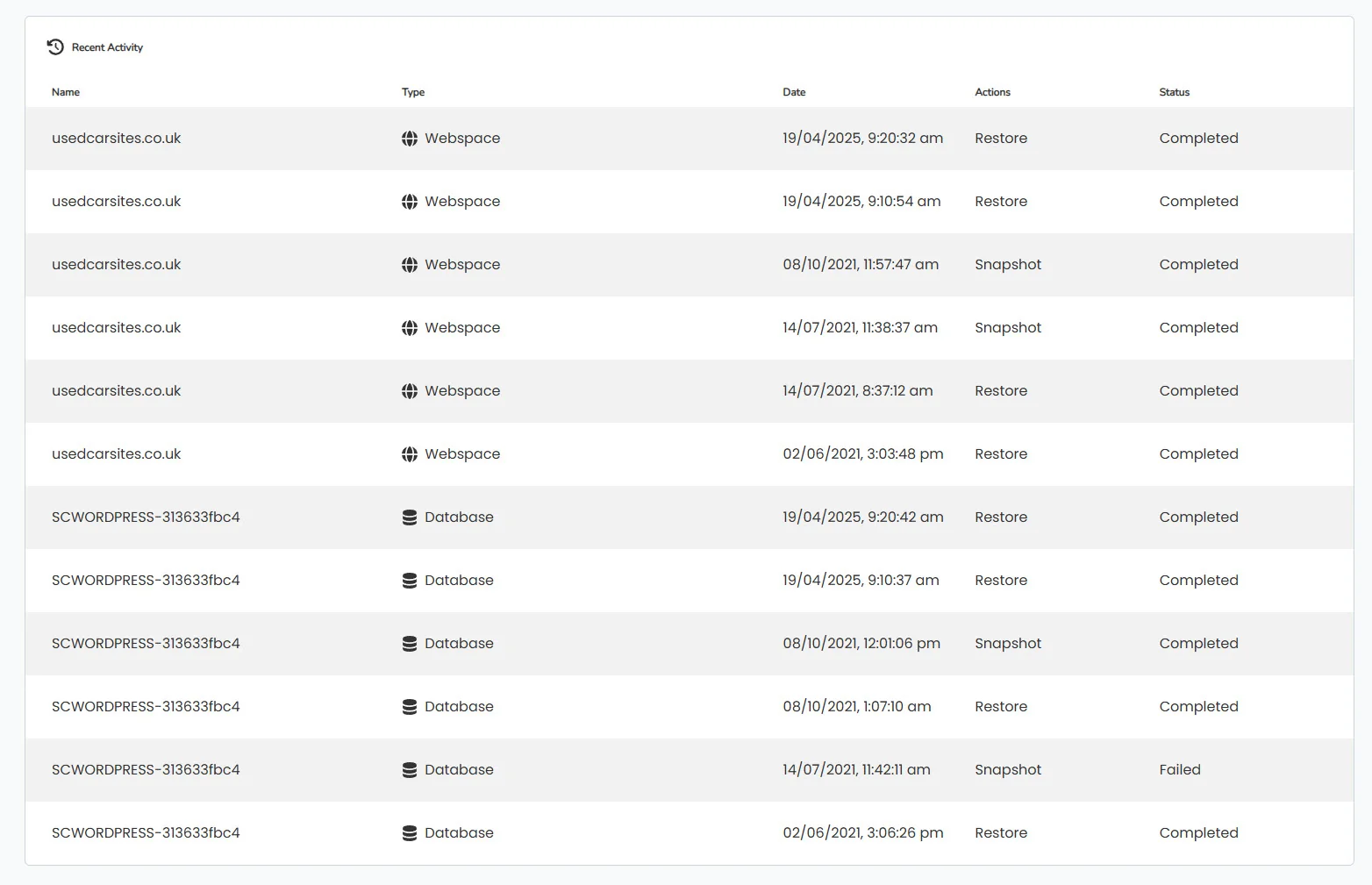
That's the honest pitch, and it's why our customers get to be curious rather than nervous while WordPress grows its AI layer. If your current host's answer to "how do I undo what an agent did on Tuesday?" is a support ticket and a prayer, this would be a sensible summer to fix that, before the agents arrive rather than after. Moving is less dramatic than people fear (here's exactly what happens when you switch), and the migration tools are free and you drive them yourself. Start on the Business plan of our managed WordPress hosting if you can: Timeline Backup Pro is standard on it, which adds mailbox backups and 60-day database history, so even your email carries a safety net while you experiment.
Frequently Asked Questions
What is an AI agent for WordPress?
An AI agent is software that connects to your WordPress site and takes real action on it: drafting and publishing posts, editing pages, updating settings or organising content, without you clicking through the dashboard. It differs from a chatbot or writing assistant because it acts on a goal rather than just producing text. Since WordPress 7.0, the Abilities API and MCP Adapter give agents a standard, permission-controlled way to do this.
Can AI manage my WordPress site on its own?
Increasingly, yes, for defined tasks: content creation, metadata, comments, categories and routine tidy-ups. WordPress.com already lets Claude and ChatGPT manage content with per-change approval. Fully hands-off management is not where sensible operators are in 2026: agents still fail confidently and at speed, so they belong on a leash of limited permissions, staging and restore points.
Is it safe to let an AI agent make changes to my website?
It's as safe as your ability to undo what it does. Give an agent a limited role via an Application Password, point it at a staging copy first, take a snapshot before it starts, and make sure your host keeps 30 days of separate restore points. With those in place, the worst case is a one-click rollback. Without them, you're trusting an approval prompt you'll eventually stop reading.
What are the Abilities API and MCP in WordPress?
The Abilities API, introduced in WordPress 6.9, is a registry where core, plugins and themes describe what they can do in a machine-readable, permission-checked way. The MCP Adapter, part of WordPress 7.0, exposes those abilities over the Model Context Protocol so external AI tools can discover and call them. Together they're the official plumbing that lets AI agents operate WordPress without fragile screen-clicking automation. We've since built and shipped a commercial MCP server of our own, and published the full bill of materials for hosting it, including why a streaming endpoint cannot live on shared hosting.
Do I need special WordPress hosting for AI agents?
You don't need hosting with an AI badge. You need hosting where mistakes are cheap: daily backups kept as 30 separate restore points, on-demand snapshots, one-click granular restore, staging, activity logs, current PHP and a human who'll help. Those features predate AI and they're exactly what makes agent experiments safe. Every 365i WordPress plan includes them via Timeline Backups and 1-click staging.
What should I do before letting an AI tool touch my WordPress site?
Four things, ten minutes. Take an on-demand snapshot so you have a restore point from the moment before. Create a dedicated user with the minimum role the tool needs and connect it with an Application Password you can revoke. Run the first experiments on a staging copy, not the live site. And check how far back your host's backups actually reach, because a single overwritten nightly copy may already contain a fault by the time you spot it.
Will WordPress 7.1 add more AI features?
Yes. WordPress 7.1 is scheduled for 19 August 2026 and extends the AI Client with response streaming and vector embeddings, and adds a Guidelines feature for encoding your editorial rules so AI tools follow your voice. The AI layer that arrived in 7.0 is being built on every release cycle, which is why preparing your hosting for it now beats reacting to it later.
Does 365i hosting support the WordPress AI features?
Yes. We tested WordPress 7.0's AI stack through the release-candidate cycle on our own sites, running current PHP, and hundreds of customer sites upgraded to 7.0 within hours of release with zero upgrade tickets and zero rollbacks. The platform pairs that with daily Timeline Backups, 30-day restore points, on-demand snapshots, staging and 7-day human support, so you can experiment with the AI features knowing the way back is one click.
Experiment with AI. Keep the undo button.
365i WordPress hosting gives every site daily Timeline Backups with 30 days of restore points, on-demand snapshots, staging, logged restores and 1-to-1 human help, 7 days a week. We'll even move your site for free. That's what AI-ready actually looks like.
Explore WordPress HostingPublished: · Last reviewed: · Written by: Mark McNeece, Founder & Managing Director, 365i
Editorially reviewed by: Mark McNeece on · Our editorial standards
Sources and further reading
- WordPress, AI, plugins, future of software engineering, Matt Mullenweg, February 2026: the "agentic usability" direction for WordPress.
- AI agents can now create and manage content on WordPress.com, Jonathan Bossenger, March 2026: agent write access with per-change approval.
- From Abilities to AI Agents: Introducing the WordPress MCP Adapter, WordPress Developer Blog: how registered abilities become MCP tools.
- Roadmap to 7.1, Make WordPress Core, June 2026: streaming, embeddings and Guidelines landing 19 August 2026.
- State of WordPress Security in 2026, Patchstack: 11,334 new vulnerabilities in 2025 and a 5-hour median time-to-exploit.
- AI coding tool wiped out a software company's database in 'catastrophic failure', Fortune, July 2025, and The Register's first-hand account: the agent incident that wrote the safety-net playbook.