When I first wrote this piece in March, the plugin was called "AI Experiments," it was on version 0.4.1, and I was running it on a Beta 5 install with seven features to poke at. Three months on, almost none of that is still true. The plugin is now just called "AI". It hit a stable 1.0 the day before WordPress 7.0 shipped. And the feature count has gone from seven to eighteen.
So I rebuilt the test. I updated our staging server to WordPress 7.0, installed the AI plugin at 1.0.1, added the three official provider plugins for Claude, Gemini and OpenAI, and went through every feature again. This is the rewritten version: what the plugin actually does now, what's genuinely useful, what I'd leave switched off, and the two new features that matter more to anyone running client sites than the headline content tools do.
Quick orientation if you read the old version: "Review Notes" is now "Editorial Notes." "Refine from Notes" is now "Editorial Updates." Image generation no longer mentions DALL-E (OpenAI's image model is now gpt-image-2). And the providers have been split out into their own separate plugins. More on all of that below.
From "AI Experiments" to "AI": What Changed
The plugin is built by the WordPress AI team, not a third party. It's still a laboratory at heart: features land as experiments, the community kicks the tyres, and the strongest ones graduate. What changed is that the lab grew up. The "AI Building Blocks for WordPress" initiative, which combines the AI Client library and the Abilities API, is now the foundation everything sits on.
Here's the state of play as I tested it, all verifiable on the WordPress.org plugin page:
- Version 1.0.0 shipped on 19 May 2026. 1.0.1 followed on 27 May with bug fixes and helper functions. WordPress 7.0 stable landed in between, on 20 May.
- The plugin was renamed from "AI Experiments" to "AI" back in version 0.6.0 (20 March). If you're searching the plugin directory, search for "AI" by WordPress.org.
- It now has 10,000+ active installations and over 45,000 downloads, with a 5-star rating across its (still small) handful of reviews.
- It needs WordPress 7.0 and PHP 7.4 or newer. The 7.0 requirement is hard, because the plugin leans on the AI Client that now ships inside core.
The plugin itself is free. You pay your chosen AI provider directly for usage. For most of the text features that's a few pence per request, which I'll come back to with real numbers.
The 18 AI Plugin Features, Grouped by Job
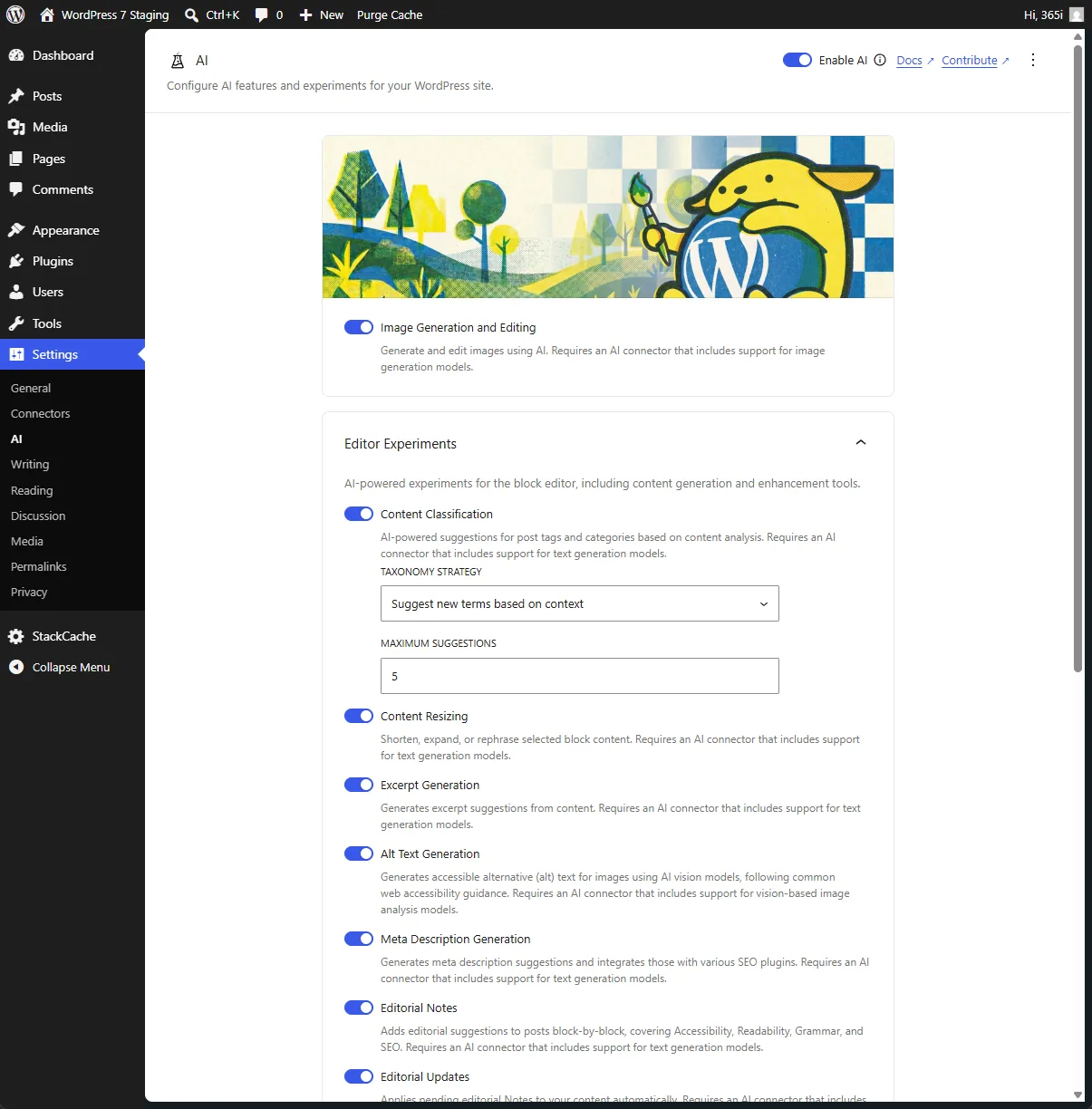
Eighteen toggles in one settings screen is a lot to look at. It's easier to think about them in four buckets: editorial, media, moderation and taxonomy, and the developer and governance layer. Everything is opt-in. Nothing fires on its own. You enable the global AI switch, then flip on only the features you want.
Editorial tools (the day-to-day ones)
- Excerpt Generation. Reads the post, writes a concise excerpt. I ran it across six older articles. Every result was usable; I tightened four to sharpen the hook. Faster than writing them cold, which, honestly, I sometimes skip.
- Title Generation. Click into the title field, hit Generate, get suggestions in a modal you can edit and regenerate before applying. Roughly 60% were serviceable. Better as a brainstorming partner than a headline writer.
- Content Summarization. Condenses a long post into a tidy overview, dropped into a Content Summary block. Clean and accurate on everything I fed it. The button stays disabled until your content is long enough to be worth summarising, which is a nice touch.
- Content Resizing. New since the beta. Select a block and shorten, expand or rephrase it. The "shorten" mode is the one I reached for most.
- Meta Description Generation. Also new. Generates meta description suggestions and hands them to your SEO plugin rather than reinventing the SEO box. Sensible.
- Editorial Notes (the old "Review Notes"). This still surprises me. It reads the post block by block and leaves Notes covering accessibility, readability, grammar and SEO. On a test post it caught two skipped heading levels and a weak colour contrast in a custom block. The grammar notes are occasionally fussy about deliberate fragments, but it reads like a second editor, not a checklist.
- Editorial Updates (the old "Refine from Notes"). The follow-on: it can now apply the editorial notes automatically rather than just flagging them. Powerful, and exactly the feature I'd be most careful with on a live site.
Media tools
- Alt Text Generation. Still the standout. Upload an image, get accurate descriptive alt text from the provider's vision model. There's now a bulk action in the Media Library and even a WP-CLI command for it:
For accessibility alone this earns its place. Most sites ship empty alt attributes; this fixes that at scale.wp ai alt-text generate - Image Generation and Editing. Promoted from experiment to a full feature. You can generate featured and inline images, and edit existing ones: erase-and-replace, expand the canvas, remove a background. Output is fine for concept and placeholder work. I still wouldn't ship it as a primary hero image on a client site, but for a quick social card it's handy.
Moderation and taxonomy
- Comment Moderation. New. It scores comments for toxicity and sentiment, then lets you sort and filter the Comments screen by either. If you run a busy comment section, this is the kind of triage that used to need a paid service.
- Content Classification. Suggests tags and categories from the post content. If your taxonomy has quietly turned into a swamp (most have), it's a tidy way to claw some order back.
Developer and admin layer
- Abilities Explorer. Lists every AI "ability" registered on your site through the Abilities API, with the ability to inspect, test and read the input and output schema for each. A debug and transparency tool rather than a content one.
- Dashboard Widgets. "AI Status" and "AI Capabilities" widgets, plus a framework for registering your own.
- Guidelines. Lets abilities respect site-wide editorial standards, so the AI output bends towards your house style instead of generic defaults.
- Experiment Framework and Multi-Provider Support. The plumbing: the opt-in system itself, and the ability to mix providers per feature.
- AI Request Logging and Connector Approvals. The two genuinely new governance features. They deserve their own section.
Request Logging and Connector Approvals
If you only manage your own blog, you can skim this section. If you run sites for other people, or you let plugins and themes loose on a shared install, these two features are the most important thing in the 1.0 release, and almost nobody is writing about them.
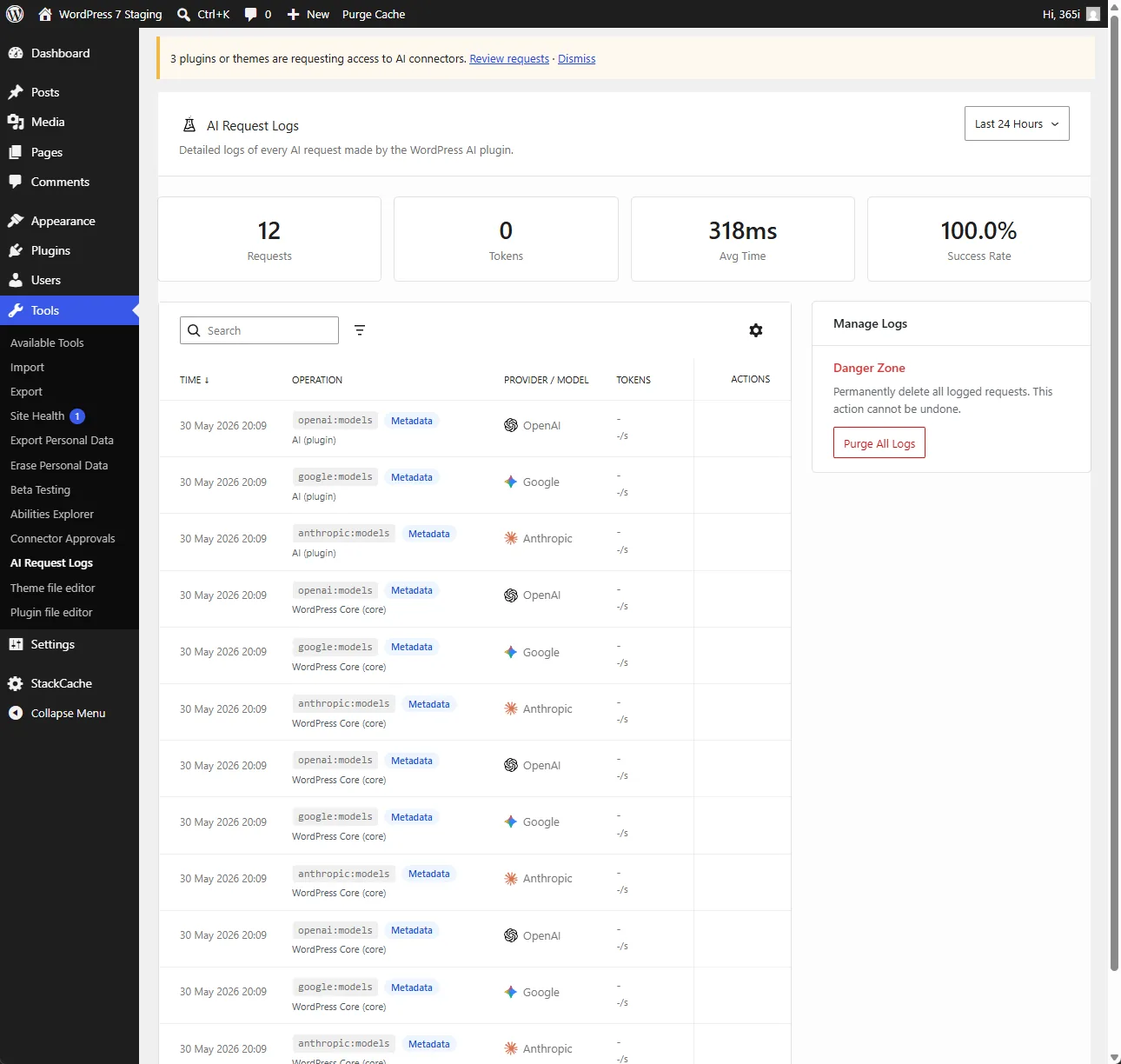
AI Request Logging records every AI request your site makes: which feature triggered it, which provider answered, and what happened. That's the difference between "we use some AI features" and being able to answer, with evidence, what your site actually sent to a third party and when. On our staging site the log showed 12 requests over the last 24 hours, each a model-list or metadata call, averaging 318ms with a 100% success rate. For anyone with a data-protection obligation, that running record is gold.
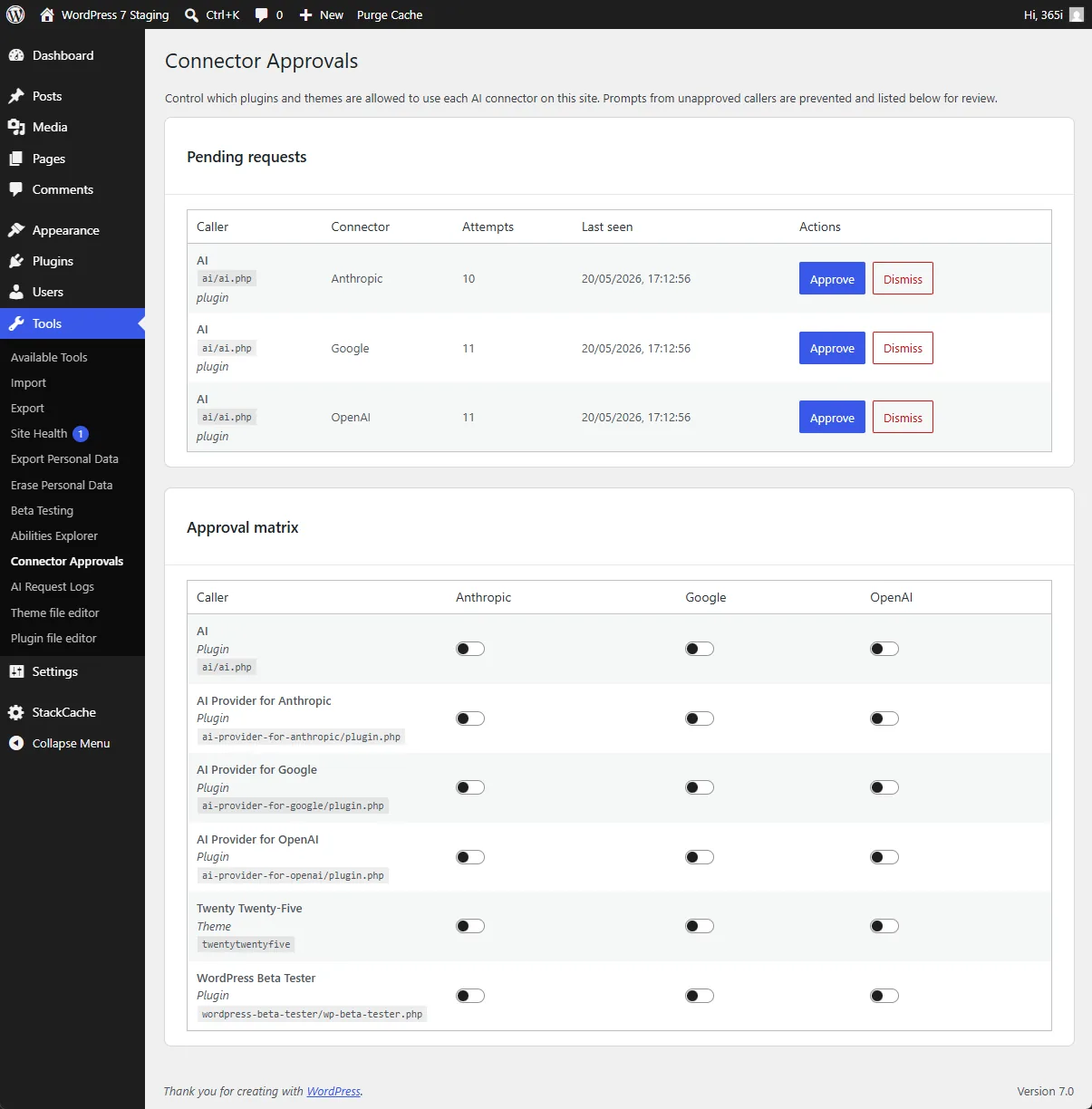
Connector Approvals is the one I'd switch on first on any multi-author or agency site. By default it blocks plugins and themes from using your configured AI connectors until an administrator explicitly approves them. So a plugin can't quietly start spending against your OpenAI key the moment it's activated. The screen gives you a pending-requests queue (on our install the AI plugin itself was queued against all three providers) and an approval matrix: a grid of every caller, themes included, against Anthropic, Google and OpenAI. You decide, per caller, what gets to use the credentials you've set up.
There's a related point in the plugin's own developer notes that matters to us directly. Hosts and agencies can pre-configure the providers, so the people actually writing posts never have to handle an API key. That's a real operational unlock. It's the difference between "here's how to get an Anthropic key, good luck" and "the AI features just work, we've set them up."
"Design for agentic usability: Strengthen APIs, WP-CLI, and machine-friendly interfaces so personal agents can safely operate WordPress tasks without brittle UI automation."
Matt Mullenweg, WordPress, AI, and the Future of Software Engineering, February 2026
Request Logging and the WP-CLI alt-text command are exactly that idea showing up in shipped code. The plugin isn't trying to write your posts for you. It's building the safe, observable rails so AI can take the tedious jobs (alt text for fifty images, a toxicity pass on the comment queue) while you keep the decisions. After more than 20 years hosting WordPress, that's the version of "AI in the CMS" I actually trust.
The Provider Plugins, and Which One Wins
This is the biggest architectural change since the beta. The providers are no longer baked into one plugin. They're three separate, official plugins, each at 1.0.1:
- AI Provider for Anthropic (Claude)
- AI Provider for Google (Gemini)
- AI Provider for OpenAI (GPT and gpt-image-2)
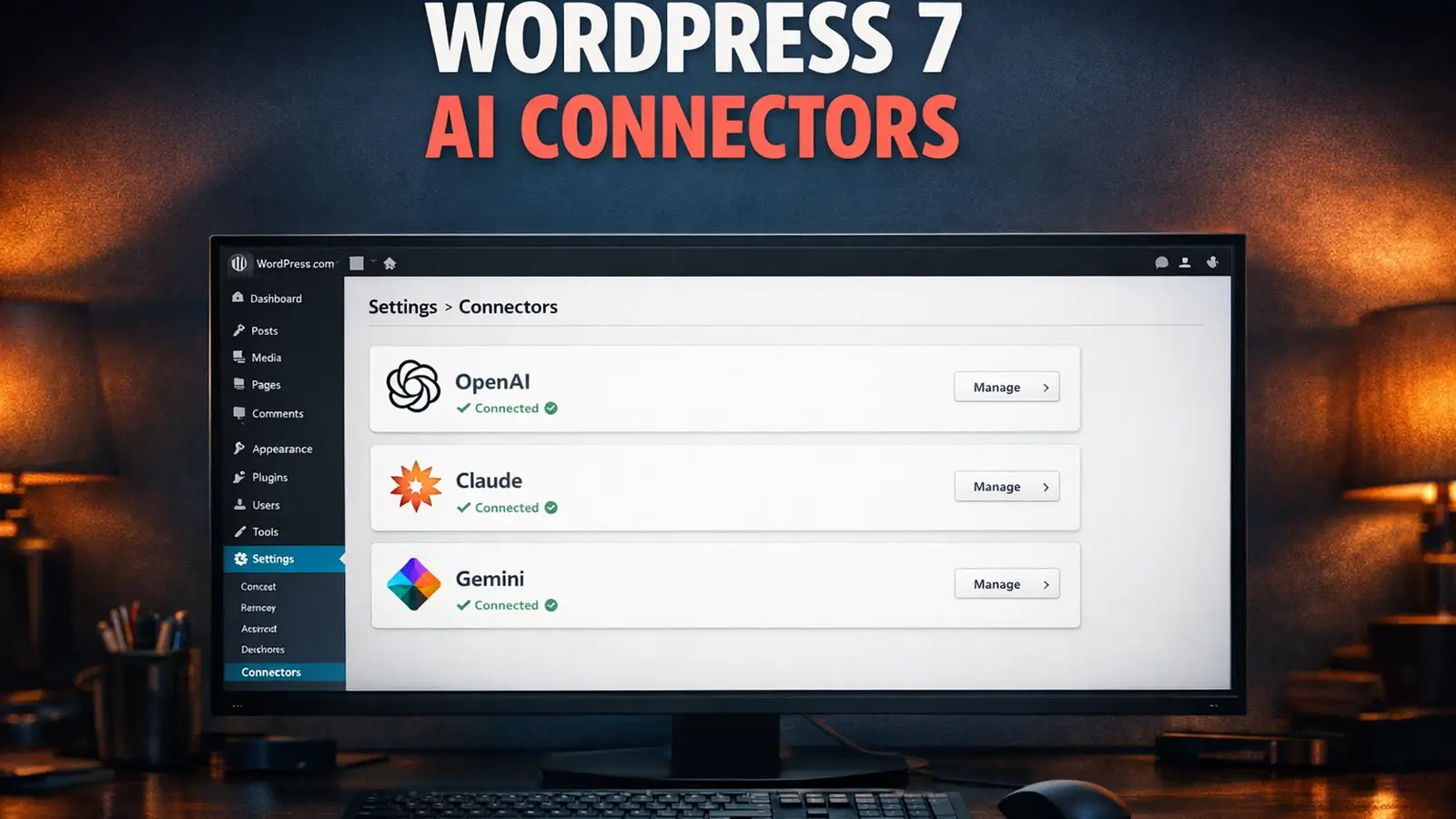
You install the providers you want, add your key under Settings > Connectors, and the AI plugin uses whichever you point each feature at. I ran all three on staging so I could compare like for like.

Claude wrote the tightest, most natural excerpts and summaries, and its Editorial Notes read like feedback from an experienced editor. For the text work, it's my default.
Gemini produced the most detailed alt text, pulling context out of an image rather than just naming the objects in it. Its title suggestions also had the widest creative range.
OpenAI handles image generation through gpt-image-2 and gives solid, quick concept images. On the text features it was capable but a shade more formulaic than Claude.
The useful part is that you can mix them per feature: Claude for Editorial Notes and excerpts, Gemini for alt text, OpenAI for images. The Connectors system makes that switch painless.
"Providing this foundation [AI Client], in collaboration with the Abilities API, will make WordPress ready for AI, both as a consumer and as a tool."
Felix Arntz, Google-sponsored WordPress Core Contributor, Proposal for merging WP AI Client into WordPress 7.0, February 2026
What It Costs UK Small Businesses
Here's the part that actually moves the needle for a small UK business. Before this plugin, getting AI alt text, content review and excerpt writing inside WordPress meant paying for premium add-ons. Yoast Premium is around £99/year. Jetpack AI starts near £7.50/month. Standalone AI writing tools run £15 to £50 a month.
The AI plugin gives you most of that for the cost of the API calls alone. And those calls are cheap. A blog post that touches all the text features costs under 5p in usage on the providers I tested. Even heavy use rarely tops a few pounds a month for a typical small site. Claude's API, for reference, starts at around $3 per million input tokens, which is less than the coffee you'll drink writing the post.
I've hosted WordPress since 2002, and I remember this exact pattern when the REST API arrived. People asked "why would I need that?" for about two years. Then Gutenberg landed and quietly depended on it, and suddenly every modern feature did too. The AI Client is the same kind of foundational shift. You don't have to care about it today. The plugins you'll lean on in 18 months will all be built on it.
The practical advice for managed WordPress hosting customers is short. You're on WordPress 7.0 already, so install the AI plugin, add one provider plugin, switch on Editorial Notes and Alt Text, and try them on your next post. If the alt text generator alone saves you ten minutes a post, it's paid for itself. If the idea of API keys makes you nervous, that's exactly what our free one-to-one WordPress assistance is for; we'll set it up with you over a screen-share.
On the hosting side, there's nothing exotic to worry about. The AI work happens on the provider's servers, not yours. Your hosting just needs to allow outbound HTTPS, which any decent host already does. If you want the full readiness picture, our WordPress 7.0 hosting readiness checklist covers it, and the launch-day report has what shipped enabled by default.
What's Coming Next for the AI Plugin
The roadmap published by the WordPress AI team points clearly at the next stage, and it's more ambitious than tidier excerpts.
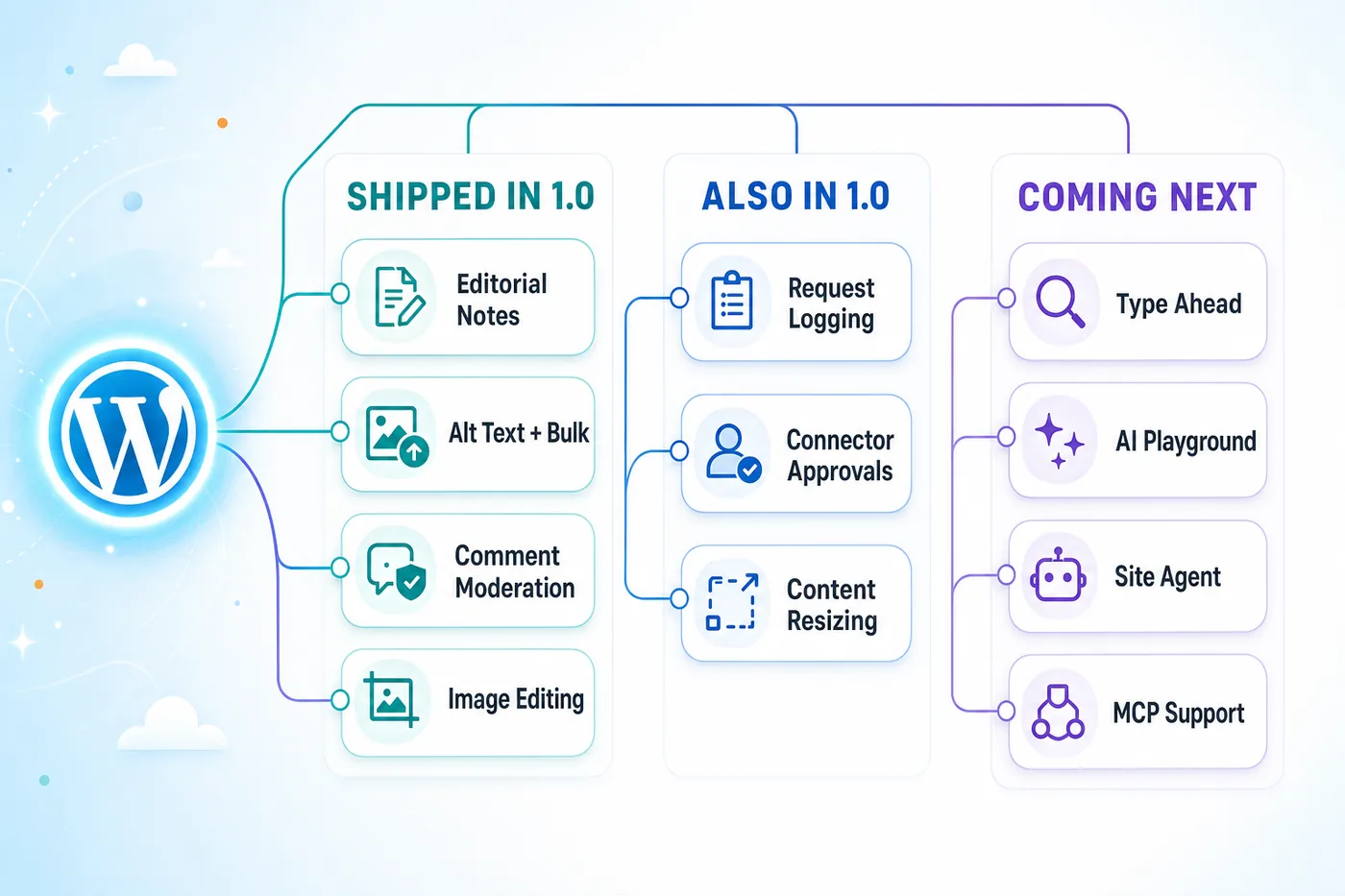
- Type Ahead: contextual autocomplete while you write in the block editor.
- AI Playground: a place to compare models and providers before you commit one to a feature.
- Content Assistant: AI-assisted writing and editing inside Gutenberg.
- Site Agent: natural-language WordPress administration. This is the one to watch.
- MCP support: the plugin is already tagged for Model Context Protocol, which is how external agents would safely operate your site. The
mcptag on the plugin page isn't an accident.
If your business already publishes AI discovery files so AI systems understand who you are, this plugin works the other side of that relationship: discovery files tell AI about your business, the AI plugin lets AI help you run it. The AI Visible Directory is the place to start if you haven't tackled that side yet. Our sister site covered the original Beta 1 AI agent support back in February, and between that foundation and what 1.0 ships today, WordPress 7.0 isn't just a CMS update. It's the point where WordPress became an AI platform.
Frequently Asked Questions
What is the WordPress AI plugin?
It's the official AI plugin built by the WordPress AI team, on the WordPress.org repository. It was called "AI Experiments" until version 0.6.0 and is now simply "AI." At version 1.0.1 it adds 18 opt-in features to the editor and admin, from alt text and excerpt generation to comment moderation, request logging and connector approvals. It requires WordPress 7.0 and at least one provider plugin configured under Settings > Connectors.
Is the WordPress AI plugin free?
The plugin and the three provider plugins are free from WordPress.org. You pay your chosen AI provider directly for usage. Costs are typically a few pence per request for text features, and under 5p for a blog post that uses all of them. Most providers also give free trial credits to start.
Which AI provider works best with the plugin?
In our testing, Claude (AI Provider for Anthropic) produced the most natural excerpts, summaries and editorial notes. Gemini (AI Provider for Google) gave the most detailed alt text. OpenAI (AI Provider for OpenAI) handles image generation via gpt-image-2. You can install all three and assign a different provider to each feature.
What are Connector Approvals and Request Logging?
They're the two governance features added in 1.0. Connector Approvals blocks plugins and themes from using your AI connectors until an administrator approves them, so nothing can quietly spend against your API key. Request Logging records every AI request your site makes, including which feature and provider were involved, which is invaluable for data-protection accountability.
Is it safe to use on a live site?
It reached a stable 1.0, but the WordPress AI team still describes it as experimental, so test on staging first. Every feature is opt-in and needs a manual trigger; nothing runs automatically. On multi-author or client sites, switch on Connector Approvals before anything else so no plugin can use your AI keys without sign-off.
Will the AI plugin replace content writers?
No. The features handle supporting work: alt text, excerpts, summaries, accessibility checks, comment triage and title ideas. They don't write articles or invent original content. In our use they're assistants that remove busywork, not replacements for the person making the editorial decisions.
WordPress Hosting Ready for AI
Our managed WordPress hosting runs WordPress 7.0 with staging on every plan, so you can test the AI plugin and its provider connectors safely before they touch your live site. Outbound HTTPS is unrestricted, and we can pre-configure the providers for you.
Explore WordPress HostingSources
- AI Plugin - WordPress.org (version, installs, feature list, changelog)
- AI Provider for Anthropic - WordPress.org
- AI Provider for Google - WordPress.org
- AI Provider for OpenAI - WordPress.org
- WordPress AI Team updates and roadmap
- AI Building Blocks for WordPress
- WordPress, AI, and the Future of Software Engineering - Matt Mullenweg
- Proposal for merging WP AI Client into WordPress 7.0 - Make WordPress Core
- WordPress AI GitHub repository
Published: · Last reviewed: · Written by: Mark McNeece, Founder & Managing Director, 365i
Editorially reviewed by: Mark McNeece on · Our editorial standards