AI crawler logging is the feature that turns AI visibility from an argument into a measurement. Instead of debating whether ChatGPT or Claude bother reading the files on your website, you open a dashboard and look. The free AI Discovery Files plugin on WordPress.org now does exactly that, and it has picked up a second big feature since we first wrote about it: AI Import, which uses WordPress 7's AI Connectors to fill in your own files from your own website.
We published this article in March 2026, when the plugin had just landed. It was on version 1.x, it generated ten files from a settings form, and that was the whole story. Five months and several releases later the story is different enough to be worth rewriting rather than patching.
The short version: the plugin is on 2.1.2, it now requires WordPress 7.0, and the two headline additions are AI crawler logging and AI Import. Everything below is the detail, including real log data from one of our own sites and an honest look at where that data stops being useful.
Generate AI Discovery Files from your dashboard
Using WordPress? Install the plugin and create all 10 files in minutes. No coding, no configuration files to edit manually.
Get the Plugin →What Changed in the AI Discovery Files Plugin Since March
If you read the original version of this article, here is what is new. If you didn't, skip to the next section and start fresh.
| Change | Version | Why it matters |
|---|---|---|
| AI Crawler Analytics | 1.3.0 onwards | Logs which AI bots read which of your files, with charts, drill-downs, and CSV export |
| AI Import | 2.0.0 | Pre-fills FAQs, services, people, and brand text from your own site using WordPress 7 AI Connectors |
| WordPress 7.0 minimum | 2.0.1 | AI Import depends on core's Abilities API and AI Client. Version 1.4.0 still serves WordPress 6.2 to 6.9 |
| Specification rebuild of every file | 2.1.0 | ai.json and identity.json now validate against the published JSON Schemas; robots-ai.txt uses real RFC 9309 syntax |
| Pre-rendered file cache | 2.1.2 | Files respond in a fraction of the time on sites with a heavy plugin stack |
Two of those deserve a proper section each, because they change what the plugin is for. Everything else is housekeeping.
AI Crawler Logging: See Which AI Bots Read Your Files

Here is the problem the feature solves. You deploy AI discovery files. You validate them. They return 200 OK. And then you have no idea at all whether any AI system has ever fetched one. Server logs would tell you, but on shared hosting most people can't get at raw access logs, and even when they can, grepping user agents out of a 400 MB file is not a thing a plumber in Kettering is going to do on a Tuesday evening.
The plugin logs the requests itself. It only watches the ten discovery file URLs it serves, so there is no user-agent check on normal page loads and no overhead on your actual website. When something fetches /llms.txt, the plugin matches the user agent against a registry of 43 AI crawler definitions grouped into eight operator families (OpenAI, Anthropic, Google, Apple and Microsoft, Meta, Amazon, AI search engines, training crawlers, and Chinese AI), records it, and shows you the result.
Logging is off by default. You turn it on in the settings, and you choose the retention window: minimum 30 days, 90 by default.
This is the dashboard from mcneece.com, a sister site of ours that publishes all ten files, over the 30 days to 2 August 2026:
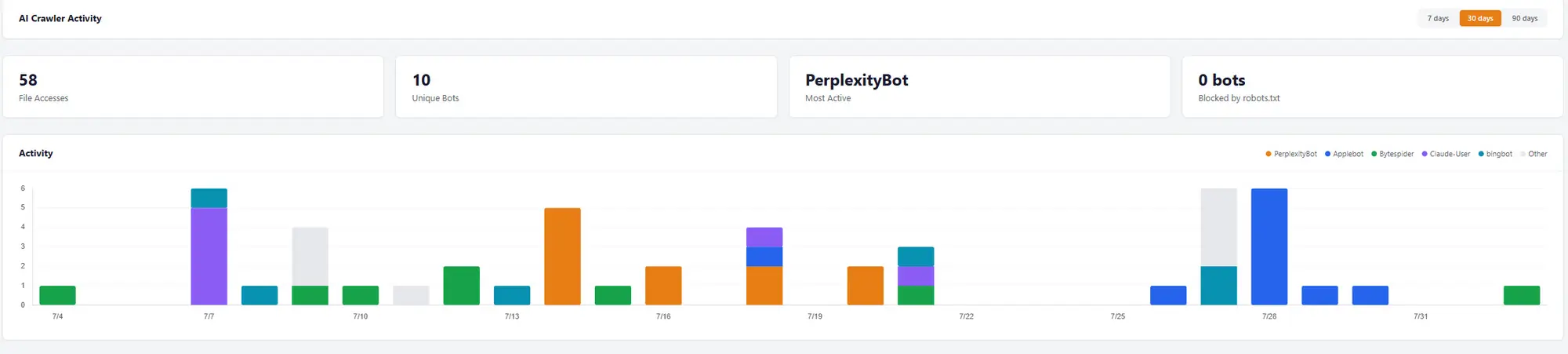
Fifty-eight fetches in a month is not a torrent. But it isn't zero either, and zero is what most site owners quietly assume. Ten distinct bots from seven operators turned up: OpenAI, Anthropic, Perplexity, Apple, Microsoft, Meta, and ByteDance.
The per-bot detail is where it gets useful, because operators run several crawlers that do different jobs and the log tells them apart. Anthropic appears twice in that list: ClaudeBot, which gathers training data, and Claude-User, which fetches a page live when somebody asks Claude about your site. OpenAI is the same story with GPTBot and OAI-SearchBot. A visit from Claude-User or OAI-SearchBot means a person was asking a question at that moment, which is a very different signal from a training crawler passing through.
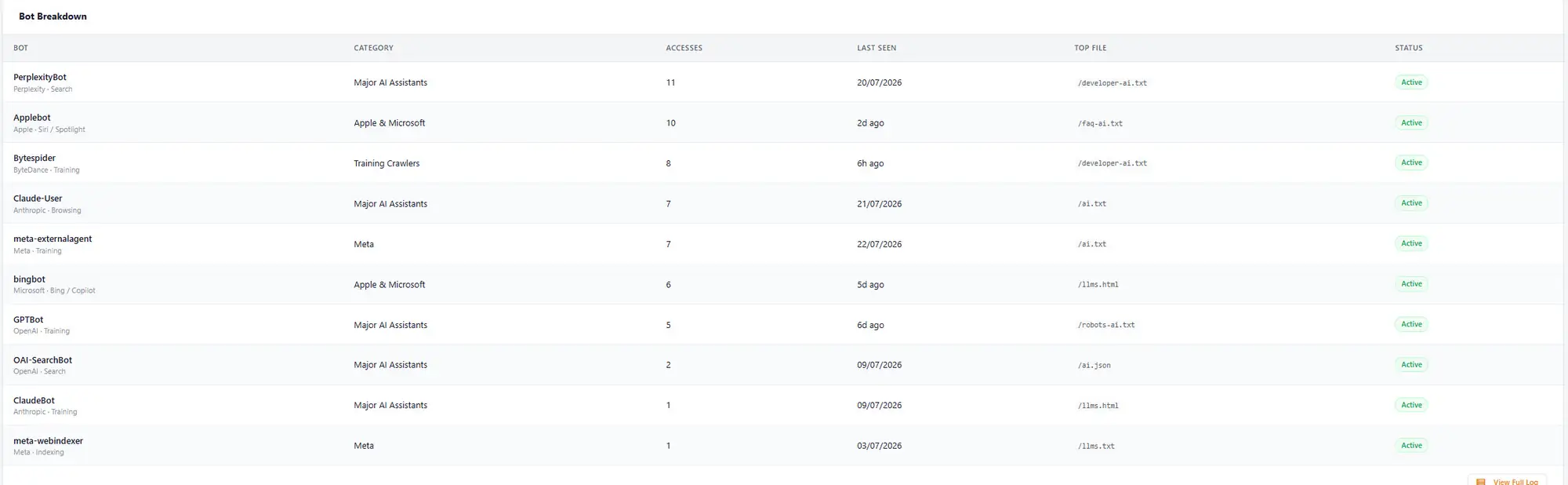
The "top file" column is the interesting one, and it isn't what you would guess. PerplexityBot's most-read file is /developer-ai.txt. Applebot's is /faq-ai.txt. GPTBot's is /robots-ai.txt. Not one of the four busiest crawlers has llms.txt as its favourite. If you had deployed only llms.txt, which is what most llms.txt plugins generate, you would have served a fraction of what these bots came for.
Do AI Crawlers Actually Read llms.txt? Here's What 30 Days of Logs Show
This is where honesty is worth more than enthusiasm, because there is a large, well-run study that says the opposite of our dashboard.
In May 2026 Ahrefs looked at 137,210 domains. Around 28% published an llms.txt file, and 97% of those files received zero requests that month. Of the 3% that got any traffic at all, 96% of the requests came from bots, and most of those bots were SEO audit tools rather than AI systems. Retrieval crawlers, the ones that actually feed AI answers, made up around 1% of requests. Louise Linehan, who co-authored the study, doesn't hedge her conclusion:
"The cons outweigh the pros right now. If you want to show up in AI search, there are more reliable ways to improve your visibility than this file."
Louise Linehan, Ahrefs, We Analyzed 137K Sites: 97% of llms.txt Files Never Get Read
She's right about the median website, and we're not going to pretend otherwise. Most llms.txt files sit there untouched. But "97% of files get zero requests" is a statement about a distribution, and a distribution has two ends. The useful question is not whether the average llms.txt gets read. It's whether yours does. Until this feature existed, nobody on shared hosting could answer that.
So here is our position, stated plainly. mcneece.com is not a typical website: it publishes the full set of ten files, it's listed in the AI Visible Directory, and it's linked from a specification site. That's exactly the profile you'd expect to sit in the 3% rather than the 97%. We are not claiming our 58 fetches are what a new site should expect. We're claiming that the gap between 58 and zero is measurable, on your own site, for free, and that guessing is worse than measuring.
The other thing worth taking from the Ahrefs data is a warning about our own numbers. If a fifth of llms.txt requests industry-wide come from audit tools, then any crawler dashboard can be inflated by scanners pretending to be bots. User agents are a claim, not a credential. We come back to that in the limits section.
Which AI Discovery Files Get Read Most (and Which Get Ignored)
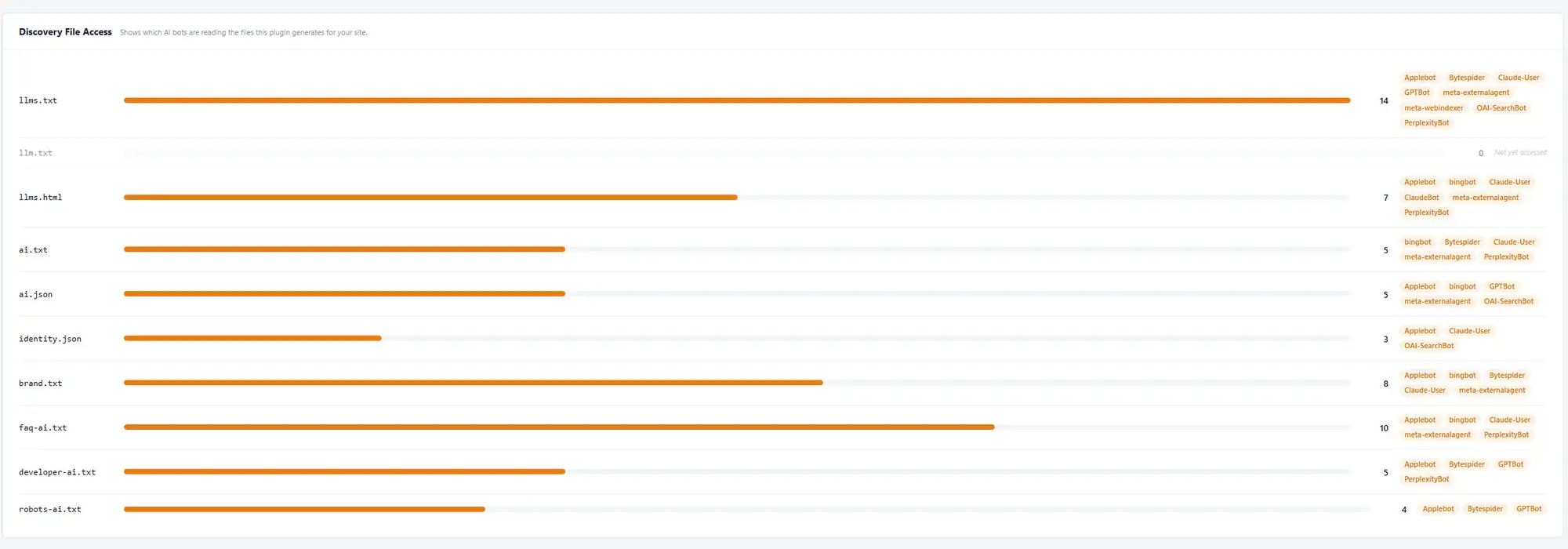
Ranked by reads over that window:
| File | Reads | Tier |
|---|---|---|
llms.txt | 14 | Essential |
faq-ai.txt | 10 | Recommended |
brand.txt | 8 | Recommended |
llms.html | 7 | Complete |
ai.txt | 5 | Essential |
ai.json | 5 | Recommended |
developer-ai.txt | 5 | Complete |
robots-ai.txt | 4 | Complete |
identity.json | 3 | Recommended |
llm.txt | 0 | Complete |
llms.txt leads, as you'd expect. After that the ordering stops matching the tiers. faq-ai.txt and brand.txt, both Recommended rather than Essential, beat four of the files that sit above or alongside them in the specification. Two files that exist to tell an AI how to describe you outrank the two that exist to tell it what it may do with you.
That has a practical consequence. The single most common way people implement AI visibility is to install a plugin that writes one llms.txt and stop. On this evidence that leaves the two files AI assistants reach for next completely empty.
And llm.txt, the compatibility redirect that catches the common typo, sat on zero for the entire month. We're publishing that alongside the good numbers because leaving it out would be the sort of selective reporting this article is arguing against.
AI Import: Using WordPress 7 AI Connectors to Fill In Your Files

The honest weakness of the original plugin was the form. Ten files' worth of fields is a lot of typing, and the answers were already sitting on the website: the services are on the services page, the FAQs are on the FAQ page, the boilerplate is in the About page's first paragraph. Copying your own website into a settings screen is miserable work, and half-finished forms produce thin files.
WordPress 7.0 supplied the fix. Core now ships the Abilities API, which lets a plugin publish what it can do in a machine-readable way, and the AI Client, which Felix Arntz of the core team describes as:
"A provider-agnostic PHP API that lets plugins send prompts to AI models and receive results through a consistent interface."
Felix Arntz, WordPress Core, Introducing the AI Client in WordPress 7.0
Alongside it sits the Connectors API, which adds a Settings > Connectors screen where you configure an AI provider once for the whole site. WordPress 7.0 ships connectors for OpenAI, Anthropic, and Google. We covered what these actually do in practice when we tested the AI Connectors on WordPress 7 Beta 2.
The plugin registers seven abilities against that infrastructure:
extract-faq: question and answer pairs forfaq-ai.txtextract-services: your service listextract-key-people: named people foridentity.jsonextract-boilerplate: the standing description of the businessextract-taglines: homepage taglinesextract-socials: social profile URLs forsameAsextract-brand-voice: tone rules forbrand.txt
You point one at a page on your own site and it drafts the entries. Four design decisions in that flow are worth knowing about, because they're the difference between a useful feature and a liability:
It's bring-your-own-key. The token cost lands on the connector you configured, not on a subscription to us. A worst-case full import session comes in under 10p on a sensibly priced model. There is no plugin-side account, and a local counter on the Status tab tracks how many imports you've run without phoning home.
It can only read your own site. Cross-domain URLs are rejected before any fetch happens. The allowlist covers your site and, on multisite, the other sites in your network. You cannot point it at a competitor and harvest their FAQ page.
Nothing saves without you. Every extraction arrives as a checklist in a review modal. You tick what you want, then click the page's normal Save Changes button. Existing entries are never replaced, so running an import twice can't quietly overwrite something you wrote by hand.
Every string goes through an AI fingerprint filter. This one made us laugh, given how much of our own editorial policy it duplicates. Text coming back from the model is run through a deterministic post-process that strips em dashes and smart quotes, removes marketing filler ("seamless", "leverage", "in today's world"), and flags AI sentence patterns like "it's not just X, it's Y" for you to look at before saving. The output is meant to read like a person wrote it, because AI systems are going to quote it back to your customers.
Long pages are handled too. Anything over 12 KB is split into 8 KB chunks with a 500-byte overlap, up to five chunks, with results deduplicated across them. That matters for a services page that runs to several thousand words.
If AI Import is greyed out, the cause is almost always that no provider is configured at Settings > Connectors. Version 2.0.1 fixed a genuine bug here: the plugin used to ask WordPress whether connectors existed, and core answers yes for every connector definition it ships regardless of whether you've entered a key. It now asks the AI Client's own registry whether a provider is actually configured, which is the same check the AI Client uses before it will attempt a prompt.
What the AI Discovery Files Plugin Actually Generates
Ten files, served dynamically from your settings. Nothing is written to disk, which is why deactivating the plugin simply stops the files being served rather than leaving orphans in your web root. Together they're the foundation layer of what the industry has started calling generative engine optimisation (GEO), or answer engine optimisation: making a website legible to systems that answer rather than rank.
| File | Purpose | Who Uses It |
|---|---|---|
llms.txt |
Structured business summary for AI crawlers | ChatGPT, Claude, Perplexity |
llms.html |
Human-readable version of the AI summary | Browsers, search engines |
ai.txt |
AI usage permissions and restrictions | AI bots (like robots.txt for AI) |
ai.json |
Machine-readable AI interaction rules | AI systems and developer tools |
identity.json |
Structured business identity data | AI knowledge graphs |
brand.txt |
Brand voice and naming rules | AI content generation |
faq-ai.txt |
Common questions and answers about your business | AI assistants answering user queries |
developer-ai.txt |
Technical documentation for developer-facing AI | Coding assistants |
robots-ai.txt |
Fine-grained AI bot access controls | AI crawlers |
llm.txt |
Redirect to llms.txt (catches the common typo) | All AI systems |
Version 2.1.0 rebuilt most of these against the published specifications rather than against a reasonable guess, which is a bigger change than the version number suggests. ai.json and identity.json now validate against their JSON Schemas. identity.json uses Schema.org vocabulary (legalName, alternateName, sameAs, contactPoints, areaServed) and there's an Organisation Type selector on the Identity tab to go with it. robots-ai.txt emits real User-agent: and Disallow: stanzas instead of the readable-but-invalid shorthand it used before. And ai.txt and ai.json are generated from one internal mapping, so the two can't contradict each other.
The plugin still auto-detects your site name, tagline, and published pages as a starting point. The rest is yours to fill in, whether by hand or with AI Import. The quality of the files still tracks the effort you put into the settings, and that hasn't changed.
The Five-Minute Setup for llms.txt and the Other Nine Files
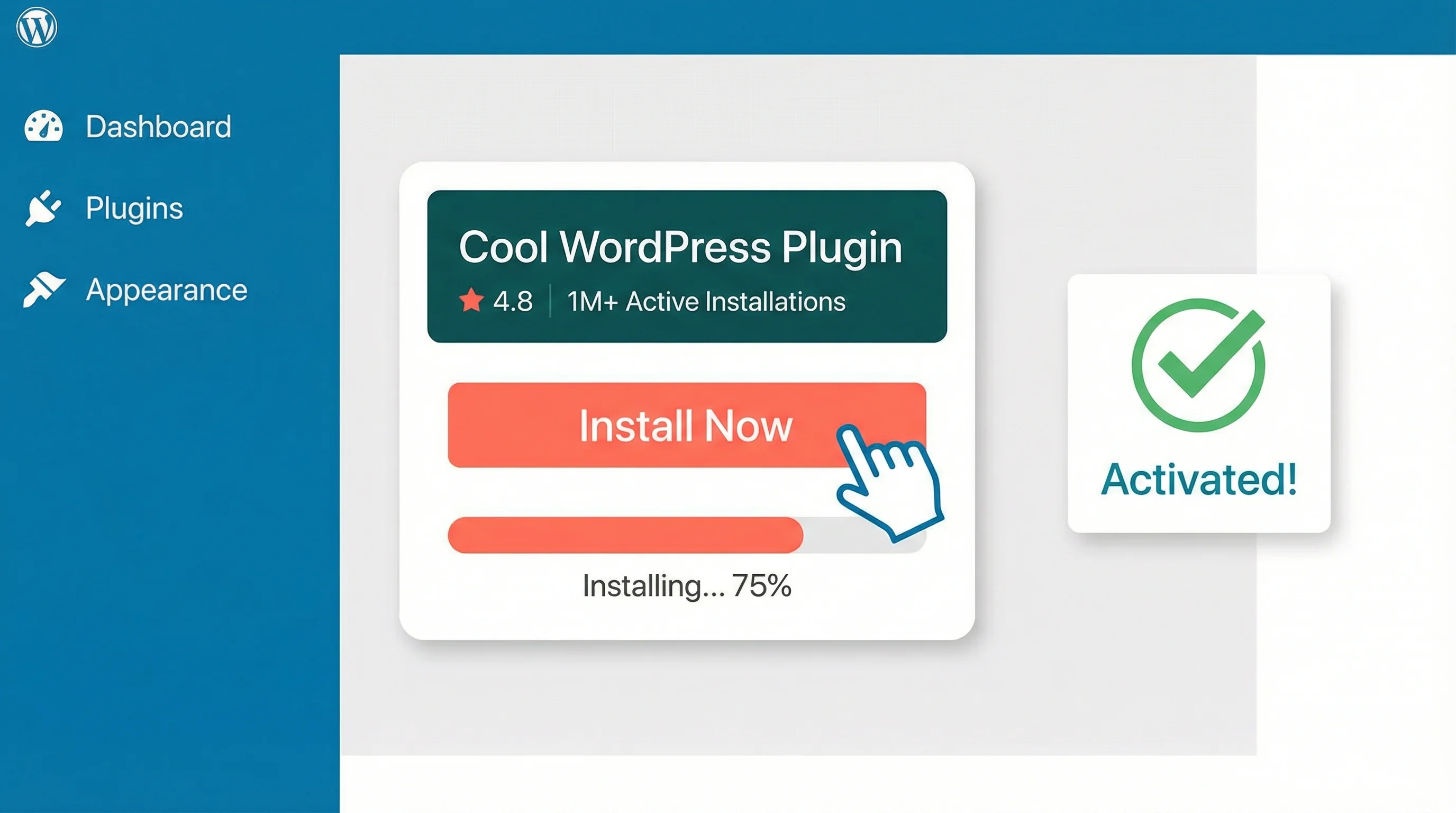
Step 1: In your WordPress admin, go to Plugins > Add New. Search "AI Discovery Files". Install and activate.
Step 2: Open the AI Discovery settings page. You'll find tabs for Identity, Permissions, Content, Technical, Preview, and Status.
Step 3: Fill in the Identity tab. If you're on WordPress 7.0 with a connector configured, use AI Import to draft the FAQ, services, and brand sections from your own pages, then edit what it gives you.
Step 4: Preview each file on the Preview tab, then enable the ones you want on the Status tab. The tier progress indicator shows how far through Essential, Recommended, and Complete you are.
Step 5: Turn on crawler logging in the settings if you want the analytics. Then leave it alone for a month.
Validation runs against the specification and flags problems before a file goes live. Conflict detection checks whether a physical file already exists at the same URL, and if one does, the plugin will not override it: it tells you on the Status tab and leaves your file alone. Delete the physical file if you want the plugin to take over.
Once you're live, check the result with the AI Visibility Checker, which scans your domain and reports which files it finds, whether they're valid, and what's missing. Our guide to validating AI discovery files covers the failure modes that pass a 200 OK check and still break.
What Our WordPress Hosting Customers Keep Asking Us

We've had a steady stream of emails from WordPress hosting customers, and they're all variations on the same thing. Real examples, names changed:
"I asked ChatGPT to recommend a plumber in Kettering and my company didn't come up. I've been trading 18 years. My competitor who's been going two minutes showed up instead. What am I doing wrong?"
David H., plumbing contractor, Northamptonshire
Nothing, David. The problem is that ChatGPT doesn't crawl Google results. It uses its own crawlers, and unless your site has files that tell those crawlers who you are, it's working from whatever scraps it can find. Your competitor probably doesn't have AI discovery files either; ChatGPT just happened to find a mention of them on a directory listing somewhere.
"My daughter told me people are using AI instead of Google now. I spent £3,000 on SEO last year. Does none of that matter any more?"
Sarah T., independent retailer, Leicester
Your SEO still matters, Sarah. Google isn't going anywhere, and good SEO helps with AI Overviews too. But your daughter's right that more people go straight to ChatGPT or Perplexity for a recommendation. Your SEO investment makes sure Google can find you. AI discovery files make sure the AI assistants can. They work together.
"I don't understand any of this AI stuff. I just need my WordPress website to show up when people search for what I do. Can you just sort it for me?"
James R., accountancy practice, Corby
Completely understand, James. That's half the reason the plugin exists. You don't need to understand JSON files or llms.txt specifications, and with AI Import you don't even need to do most of the typing. If you'd rather we handled it, there's an AI discovery files setup service. Most of our customers do it themselves.
"I tried asking Claude about my hotel and it said we had 12 rooms. We have 34. Where is it getting this from and how do I correct it?"
Margaret K., boutique hotel owner, Rutland
That's the problem in one sentence, Margaret. Claude is pulling from your website, third-party booking sites, and old directory listings, some of which haven't been updated in years. An identity.json tells Claude directly: here's our name, here's what we offer, here are the facts. A faq-ai.txt lets you address room count, facilities, and pricing head on. And now, when Claude-User next fetches one of those files, you'll see it in the log rather than wondering.
If you're new to all of this, our complete guide to the ten files and our piece on the AI identity layer cover the ground properly.
Why Your Hosting Setup Decides Whether AI Crawlers Reach Your Files
Here's something the plugin can't fix on its own: if your host blocks AI crawlers at the server level, your discovery files are invisible no matter how well written they are. It's a shop sign behind a locked gate.
We've seen this with several budget hosts, where security rules aimed at scrapers catch GPTBot, ClaudeBot, and PerplexityBot in the same net. The files pass validation, look perfect in the preview, and no AI system can reach them. We wrote that up in detail in is your WordPress host quietly blocking AI bots, and the wider pattern of crawlers ignoring or being blocked by robots.txt shows up in Cloudflare's compliance data.
Crawler logging is what makes this diagnosable. A dashboard reading zero after a month, on a site whose files validate, points at the server rather than the files. That is a different conversation with your host than "I think something might be wrong".
On 365i's WordPress hosting, AI bots reach your discovery files without interference, and the hosting platform doesn't treat them as threats. If you're elsewhere, our free AI Crawler Checker tests 14 major AI crawlers against your domain two ways: what your robots.txt says, and whether the server actually serves them. The robots.txt checker is worth a look at the same time.
One hosting note specific to this plugin. Discovery files can't be edge-cached, because every request has to reach PHP for the logging to work. On a site with a heavy plugin stack that used to mean booting the entire stack to emit a small text file. On mcneece.com, which runs Elementor and Crocoblock, that was around five seconds of page generation, only 0.1s of it database work and roughly four seconds of PHP execution. Google's Lighthouse "Agentic Browsing" audit was reporting "Fetch of llms.txt failed" because its throttled request timed out. Version 2.1.2 caches the rendered output and serves it before page builders load. If you're running a builder-heavy site with logging on, make sure you're on 2.1.2 or later.
What AI Crawler Logging Doesn't Tell You
Four limits, none of them small.
A fetch is not a citation. The log proves a bot requested a file. It does not prove the content influenced an answer, and it certainly doesn't prove anyone was recommended your business. Treat the dashboard as evidence of access, nothing more. Rand Fishkin of SparkToro is right that measuring actual brand presence is a separate discipline:
"You can track brand presence frequency with statistical rigor, if you run prompts enough times."
Rand Fishkin, Co-founder, SparkToro, Near Media Podcast
User agents can be faked. Anything can claim to be GPTBot. Given the Ahrefs finding that a fifth of llms.txt requests come from audit tools, some share of any crawler dashboard is scanners and researchers rather than AI systems. The plugin matches names, not verified identities.
Logs undercount. Some AI agents fetch pages with a browser user agent, particularly when a user has asked a live question about your site. Those visits don't appear as bots. The real number is higher than the dashboard shows, by an unknown amount.
Thirty days of one website is an anecdote, not a study. Our 58 fetches are one data point from a site that is unusually well set up for this. We've published the figures because first-party data beats speculation, not because they generalise.
The measurement that actually matters is still the one you can do by hand. Ask ChatGPT about your business today and screenshot the answer. Deploy the files. Ask again in a month. Our research across 1,000 UK business websites found 99.7% had zero AI discovery files, so in most sectors you're comparing yourself against competitors who've done nothing at all.
Essential, Recommended, or Complete? Choosing Your AI Discovery Files
The specification groups the ten files into three tiers, and the plugin follows it. Note that this has changed since we first wrote about it, so if you set up early the labels won't match what you remember.
Essential (2 files): llms.txt and ai.txt. Who you are, and what AI systems may do with your content. If you do nothing else, do these.
Recommended (6 files in total): adds identity.json, ai.json, brand.txt, and faq-ai.txt. On our own log data this is the tier that earns its keep, because faq-ai.txt and brand.txt were the second and third most-read files on the site.
Complete (all 10): adds llm.txt, llms.html, developer-ai.txt, and robots-ai.txt. Worth it if you have an API, developer documentation, or technical products. PerplexityBot's most-read file on mcneece.com was developer-ai.txt, which is a reasonable argument for going the whole way if you're a technical business.
WordPress 7 Requirements, GPL Licence, and No Lock-In
The plugin is GPL v2 and free, with no premium tier planned. Disable it and the files stop being served; nothing is deleted and your settings are preserved. Delete it and everything is removed cleanly.
Version 2.0.1 raised the minimum to WordPress 7.0, because AI Import depends on the Abilities API, AI Client, and Connectors API that arrived in that release. PHP 7.4 through 8.5 is supported. If you're on WordPress 6.2 to 6.9 and not ready to upgrade, version 1.4.0 remains available and still generates all ten files; you just don't get AI Import. Our write-up of WordPress's own AI plugin at 1.0 is a useful companion if you're weighing up the move.
For developers, the aidf_generated_content and aidf_collected_data filters let you modify any file's contents before it's generated. If you're an agency running this across a portfolio, that's how you template brand-specific content per client.
If you've been putting this off because it felt too technical, the barrier is lower than it was in March. The form fills itself in from your own website, the files generate themselves, and a month later you can look at a dashboard and see whether it worked. That last part is new, and it's the bit that makes the rest arguable rather than a matter of faith.
WordPress hosting that works with AI, not against it
365i's WordPress hosting doesn't block AI crawlers. Your discovery files get served, your business gets represented, and you get a file manager with root-level access to inspect everything.
See WordPress Hosting PlansFrequently Asked Questions
How do I see which AI bots are crawling my site?
Turn on AI crawler logging in the AI Discovery Files plugin settings. It watches the ten discovery file URLs it serves and matches incoming requests against 43 AI crawler definitions across eight operator families. The dashboard shows total accesses, unique bots, the most active crawler, which files each bot read, and whether any are blocked by your robots.txt. Retention is configurable with a 30-day minimum and a 90-day default, and the log exports to CSV.
Do AI crawlers actually read llms.txt?
Some do, but most files never get touched. Ahrefs analysed 137,210 domains and found 97% of llms.txt files received zero requests in May 2026, with SEO audit tools accounting for more of the remaining traffic than AI systems. On our sister site mcneece.com, which publishes all ten files, the plugin logged 58 fetches from 10 distinct AI crawlers in the 30 days to 2 August 2026. Both things are true: the median file is ignored, and a well-configured site can measure real traffic. Logging is the only way to know which case you're in.
What is AI Import and what does it cost?
AI Import uses WordPress 7.0's Abilities API and AI Client to draft your FAQs, services, key people, brand voice, taglines, and social profiles from pages on your own website, so you don't have to retype them. It's bring-your-own-key: the token cost lands on the AI provider you configured at Settings > Connectors, and a worst-case full import session costs under 10p on a reasonably priced model. There is no subscription and no plugin-side account.
Does the plugin need WordPress 7.0?
Version 2.0.1 and later require WordPress 7.0, because AI Import depends on core's Abilities API, AI Client, and Connectors API. PHP 7.4 through 8.5 is supported. If you're still on WordPress 6.2 to 6.9, version 1.4.0 remains available and generates all ten AI discovery files without the AI Import feature.
Will AI crawler logging slow down my WordPress site?
No. Logging only runs when one of the ten discovery file URLs is requested. Normal page loads get no user-agent check, no extra queries, and no overhead. Discovery files can't be edge-cached because every request must reach PHP for logging, so version 2.1.2 added a pre-rendered cache that serves them before heavy plugins load. On a builder-heavy site that took file response time from several seconds to a fraction of one.
Is the AI Discovery Files plugin really free?
Yes. It's GPL v2, listed on WordPress.org, with no premium tier, no upsell, and no feature gating. Every feature described in this article is available to everyone. The only cost anywhere is the AI provider tokens AI Import consumes, and those are billed by your own provider, not by us.
Do I need all 10 AI discovery files?
No. Start with the Essential tier, which is llms.txt and ai.txt. The Recommended tier adds identity.json, ai.json, brand.txt, and faq-ai.txt, and on our own crawler log data that tier is where the value is: faq-ai.txt and brand.txt were the second and third most-read files. Complete adds the remaining four, which are worth it if you have developer documentation or an API.
What if I already have an llms.txt file?
The plugin detects physical files in your web root and warns you on the Status tab. It will not override a physical file: yours keeps being served. If you want the plugin to take over, remove the physical file first. The plugin never writes files to disk, so there is nothing to clean up if you change your mind.
Does this affect my Google search rankings?
Google has said it doesn't use llms.txt for rankings, and the files are served with an X-Robots-Tag: noindex header so they don't appear in search results themselves. The exception is llms.html, which is indexable by design as the human-readable page of the set. The benefit is with ChatGPT, Claude, and Perplexity, which do fetch these files.
What happens if I deactivate the plugin?
Your AI discovery files stop being served, but nothing gets deleted from your WordPress database. Reactivate and your files come back with your settings intact. Delete the plugin entirely and it removes its data cleanly. No lock-in either way.
Sources
- AI Discovery Files Plugin - WordPress.org
- AI Discovery Files Plugin Documentation - AI Visibility
- We Analyzed 137K Sites: 97% of llms.txt Files Never Get Read - Ahrefs
- 97% Of llms.txt Files Got No Requests, Ahrefs Data Shows - Search Engine Journal
- Introducing the AI Client in WordPress 7.0 - Make WordPress Core
- Introducing the Connectors API in WordPress 7.0 - Make WordPress Core
- llms.txt Proposal - Answer.AI
- LLMs.txt Proposed Standard - Search Engine Land
- WordPress Usage Statistics - W3Techs
- AI Visibility vs Google Rankings - Near Media Podcast
- AI Discovery File Adoption Study 2026 - 365i Web Design
- AI Crawler Analytics dashboard, mcneece.com, 30 days to 2 August 2026 (first-party data)
Published: · Last reviewed: · Written by: Mark McNeece, Founder & Managing Director, 365i
Editorially reviewed by: Mark McNeece on · Our editorial standards